

SOLUTION BRIEF | AUTONOMOUS VEHICLE AND SENSOR DATA
Move only the recordings your models still need.
Index each recording where it lands, add the context it lacks, and copy only the data that fills a gap. One enriched metadata catalog across every test site.
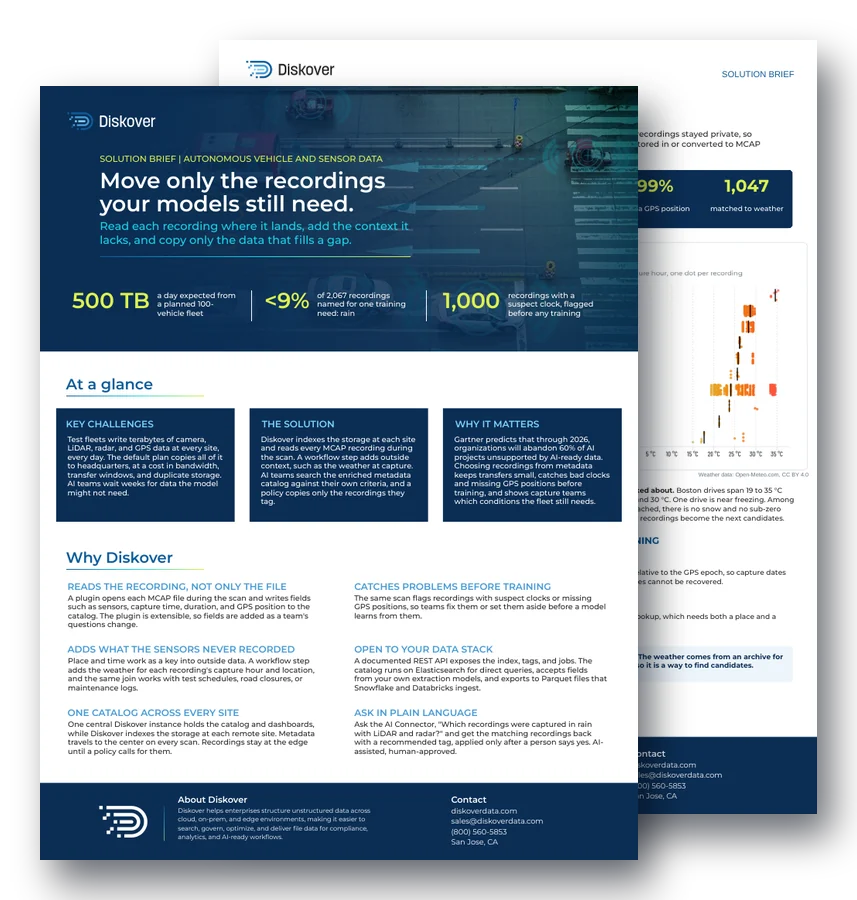
500 TB
a day expected from a planned 100-vehicle fleet
<9%
of 2,067 recordings named for one training need: rain
1,000
recordings with a suspect clock, flagged before any training
At a glance.
Key challenges.
Test fleets write terabytes of camera, LiDAR, radar, and GPS data at every site, every day. The default plan copies all of it to headquarters, at a cost in bandwidth, transfer windows, and duplicate storage. AI teams wait weeks for data the model might not need.
The solution.
Diskover indexes the storage at each site and adds MCAP recording fields to the catalog during the scan. A workflow step adds outside context, such as the weather at capture. AI teams search the metadata catalog against their own criteria, and a policy copies only the recordings they tag.
Why it matters.
Gartner predicts that through 2026, organizations will abandon 60% of AI projects unsupported by AI-ready data. Choosing recordings from metadata keeps transfers small, catches bad clocks and missing GPS positions before training, and shows capture teams which conditions the fleet still needs.
Why Diskover.
Indexes the recording, not only the file.
During the scan, the MCAP plugin writes fields such as sensors, capture time, duration, and GPS position to the catalog. The plugin is extensible, so fields are added as a team’s questions change.
Catches problems before training.
The same scan flags recordings with suspect clocks or missing GPS positions, so teams fix them or set them aside before a model learns from them.
Adds what the sensors never recorded.
Place and time work as a key into outside data. A workflow step adds the weather for each recording’s capture hour and location, and the same join works with test schedules, road closures, or maintenance logs. See metadata enrichment.
Open to your data stack.
A documented REST API exposes the index, tags, and jobs. The catalog runs on Elasticsearch for direct queries, accepts fields from your own extraction models, and exports to Parquet files that Snowflake and Databricks ingest.
One catalog across every site.
One central Diskover instance holds the catalog and dashboards, while Diskover indexes the storage at each remote site. Metadata travels to the center on every scan. Recordings stay at the edge until a policy calls for them.
Ask in plain language.
Ask the AI Connector, “Which recordings were captured in rain with LiDAR and radar?” and get the matching recordings back with a recommended tag, applied only after a person says yes. AI-assisted, human-approved.
One scan. 2,067 recordings. Every gap visible.
A global automaker asked a simple question: which recordings do our models still need? Its own recordings stayed private, so Diskover gathered nine open robotics and self-driving datasets stored in or converted to MCAP format, from test vehicles to drones and capture rigs, and ran one scan with the MCAP plugin.
2,067
recordings, 2.07 TB stored, 18.7 hours of recorded time
336 km
driven and flown, with a GPS position on 99% of recordings
1,047
recordings matched to the weather at capture
1,000
suspect clocks and 20 recordings with no GPS position, caught before training
In the demo, Diskover proposed tags from the enriched fields, and each one stayed a proposal until a person approved it: 584 recordings in a wet hour, 337 in gusts of 40 km/h or more, and 123 above 30 °C. A Diskover policy then delivered a copy of each tagged recording to the training store. Weather data: Open-Meteo.com, CC BY 4.0.
“If I can transfer only the data containing rain back home, rather than all of this data, it makes a world of difference.”
AI Data Architect, global autonomous automaker customer
How it works.
1. Index
STORAGE OR IT TEAM
Point Diskover at the storage at each test site, such as NAS, object, cloud, or edge servers. Indexing runs where the recordings land, and the data stays in place.
Example: a test site’s file share is cataloged where it sits.
2. Enrich
AUTOMATION
The MCAP plugin writes fields such as sensors, capture time, and GPS position to each record. A workflow step then adds the weather for that place and hour.
Example: a recording now shows LiDAR, radar, 18:30 UTC, and heavy rain.
3. Select
ANY AUTHORIZED TEAM
Search and chart the catalog against the AI team’s own criteria. Tag recordings directly, or ask the AI Connector, which proposes tags and applies them once a person approves.
Example: an AI lead tags 584 recordings captured in a wet hour.
4. Deliver
BY POLICY
A Diskover policy delivers a copy of each tagged recording to the training store. Every other recording stays at the edge until its retention period ends. See data mobility.
Result: only the rain recordings reach the AI team, ready for training.
Key outcomes.
Smaller transfers.
Only the recordings that fill a gap leave the site. Bandwidth, transfer windows, and storage go to the data the models need, which also keeps costs down.
Cleaner training data.
Suspect clocks and missing GPS positions surface before training, so teams fix them first, not weeks into a training run.
Faster AI cycles.
AI teams search one catalog across every site and get named candidates from metadata, so the next run starts with the data the model lacks.
Questions people ask.
Can Diskover index our recordings, or do we send our pipeline’s output?
Either path works. The MCAP plugin adds fields during the scan, or your team brings the fields its extraction pipeline already produces. Both land in the same catalog.
Can we bring our own models?
Yes. Fields your models produce can be added to the catalog alongside the plugin’s, then drive search, dashboards, tags, and moves like any other field.
Can we take the catalog out?
Yes. A documented REST API exposes the index, tags, and jobs, the catalog runs on Elasticsearch, and metadata exports to Parquet for Snowflake and Databricks.
What other dense formats does Diskover support?
Diskover offers plugins for many industries, including genomics files, media containers, images, and PDFs, and teams build their own for formats unique to their work. See the Diskover plugins.
How are tags approved before recordings move?
The AI Connector proposes tags from the enriched fields, and each one stays a proposal until a person approves it. Only then does a policy copy the tagged recordings to the training store.
Related resources.
See it on your own data.
We’ll index a sample of your environment and show you
what’s recoverable against your current storage spend.