


The Diskover platform
Organize your data. Then activate it.
Diskover is one platform with two components. DataDiscovery indexes, analyzes, and organizes your files, with the business context your teams need. DataDelivery moves them by policy. Use one, or both.
How it works
From scattered files to clear action.
DataDiscovery maps and indexes your storage. DataDelivery policies and agents move the files. Every step works from metadata, so your data stays where it is until you choose to move it.
- 1ConnectEnter each NFS, SMB, or S3 system once. Scans run read-only, in place.
- 2CatalogEvery file becomes a searchable record: name, path, size, dates, and owner.
- 3OrganizeAdd business context with plugins and tags, then search, report, and act.
- 4MoveCopy, move, or sync by policy, with a dry run first, at up to 50 Gbps per agent.
The tour
Built for estates with billions of files, where answers have to arrive in minutes, not weeks.
Follow one catalog from the first scan to the first action. Each step uses the storage you already own. Data users work from a web browser, with nothing to install on their computer.
01 Connect
Add a storage once. DataDiscovery finds the rest.
Enter each file server or S3 endpoint once, with its credentials. DataDiscovery finds its shares, exports, and buckets, and you choose which volumes to scan.
A guided setup takes an administrator from license to first scan, and new storage from any vendor plugs into the same catalog.
Works with storage such as
- NFS exports
- SMB shares
- Amazon S3
- S3-compatible object storage
- Local file systems
- Connectors for cloud and archive systems
02 Index
Billions of files, indexed at speed.
Indexers work in parallel across many systems at once, and you add nodes as your estate grows.
- Scale-out indexers that scan many systems at the same time.
- A built-in cache that keeps rescans fast.
- Every file records the storage and volume it came from.
- Use Live View to browse the storage as it is right now, when you need to see recent changes between scans.
Scale-out indexing
03 Enrich
Rich metadata, with the context your business uses.
Every file starts with its standard metadata, such as path, owner, size, and dates. Built-in plugins add more at index or post-index time, such as media details, project information, and filesystem properties.
With the Content Match plugin, DataDiscovery can look inside a file’s header to find a value written there, such as a project or job code, and add it to the catalog. Tags and rules add the rest, so every file can be found with the words your business uses.
One file, enriched
render_v7_final.exr
- March 2026First indexed on network storage (NAS)/proj/ax7 · owner j.rivera · project Ax7
- June 2026Stage changes to DeliveredFolder name updated at the next scan
- July 2026Tagged archive-2027, then approvedAdded by an Auto Tag rule after the scan
- August 2026Tiered to object storageMoved by a policy to the archive tier
04 Search
Find any file in seconds.
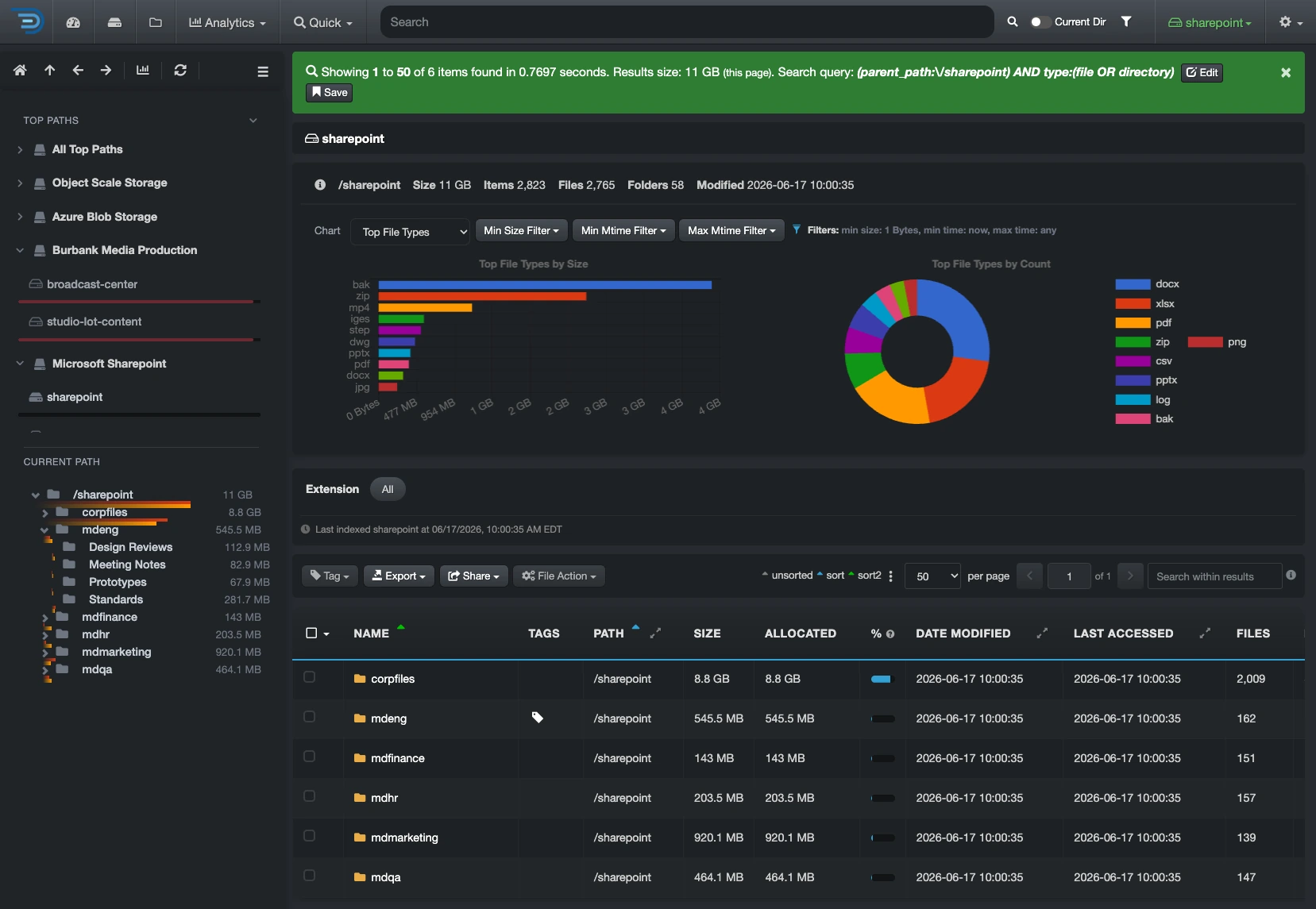
Search every system from one place, by any metadata, such as name, owner, age, file type, or tag. Users can sort results and save their own searches, and admins can save the searches teams run every week for everyone.
Searching is read-only, so you can explore freely: you can’t break anything. Actions on files need the right role.
05 Analyze
See what your data is worth, what it costs, and what to do next.
Several analytics help you discover, measure, and organize your data, such as who owns it, how old it is, what it costs, where it grows, and which files nobody uses anymore.
Dashboards and reports turn the catalog into answers for IT, finance, and data owners. The Insights dashboard goes one step further and ranks the next best actions after every scan.
06 Act
Act on what you find, on demand or by policy.
Run file actions straight from search results, or set rules that tag, move, archive, or clean up data on a schedule.
To move data, DataDelivery is the recommended mover, and DataDiscovery also works with tools such as Rclone and Dell SmartSync.
07 Deliver
Send clean data to analytics and AI.
Curate file lists by any metadata, export them, and send them where your teams work, such as Snowflake or a lakehouse.
APIs connect the catalog to your own tools and workflows.
From the catalog to your stack
- Export file lists
- Snowflake
- Lakehouses
- BI tools
- REST API
- AI pipelines
08 Ask
Ask your data in plain language.
With the AI Connector, an option on any plan, ask questions such as “Which projects have not been touched in a year?” and get answers from your catalog, on desktop or mobile, powered by the LLM of your choice.
Every action it proposes waits for a person to approve it.
Which project folders have not been touched in a year?
I found 42 project folders not modified in 12 months: 18.6 TB, mostly on Tier 1 flash.
Do you want me to tag them “archive candidate” so your team can review them?
Built for scale
Fast to index. Fast to move.
Two components
Use one. Or both.
Each component runs its own jobs, so you can use one or both.
DataDiscovery
See every file. Know what it is.
Indexes NFS, SMB, and S3 storage in place, adds business context with plugins and tags, and turns it into search, reports, and the Insights dashboard.
DataDelivery
Move it by policy. Prove it.
Copies, moves, and syncs files between file, object, and cloud storage, with a dry run first, up to 50 Gbps with a single agent, and every job logged.
Plans
Three plans, sized by file count.
Every plan includes the catalog, search, reports, and the Insights dashboard. DataDelivery and the AI Connector are options on any plan.
Professional
Index, enrich, and analyze: find and understand every file, with business context and actions you trigger.
Enterprise
Everything in Professional, plus orchestration: rules that automate the data lifecycle.
Multistream
Everything in Enterprise, plus organized datasets for AI, BI, data lakes, and lakehouses.
Go deeper
Everything you need to decide.
Plans
Diskover plans
Every plan, side by side, with DataDelivery and the AI Connector as options.
Architecture
How it fits together
The parts of each product, how they scale, and how they keep your data safe.
Plugins
More context. More actions.
Add business context to your files and act on them from search.
FAQ
Questions about the platform.
See it on your own data.
We’ll index a sample of your environment and show you
what’s recoverable against your current storage spend.