

BLOG
Before AI can read your metadata, an indexer must build the catalog.
October 27, 2026 · ~7 min read
A pathology research lead needs every slide scan from last year’s lung study before Friday’s model review.
She types the request into the artificial intelligence (AI) assistant her team already uses: which scans belong to the study, who owns them, and which ones the lab approved.
The list comes back in seconds. So did the assistant just catalog her storage?
No. The assistant read a catalog that existed before she asked, one that covers every file across all of the lab’s storage systems.
Can AI catalog metadata? Not on its own. Cataloging metadata is a mechanical process in which an indexer records the facts about every file. AI comes second, reading those records to answer questions and recommend a next step.
Metadata is the information about a file rather than the content of the file itself, such as its name, location, owner, and age. A metadata catalog collects that information for every file into one searchable index.
Reading and cataloging are two different jobs.
Can AI catalog metadata by scanning your storage directly? An AI model does not scan storage itself. It reads only what a tool gives it, such as a list of file records, and then does what it does well: group the files, compare them, and explain them in plain language.
Cataloging means recording facts about every file once, in the same way, storing that record, and repeating the scan on a schedule so the record stays true. That mechanical work belongs to an indexer, whether you run 2 file systems or 200.
A census bureau and an analyst show the difference. The bureau counts every household on a set date, with the same form, and keeps the records. The analyst reads those records and explains what they mean, and every answer depends on the count the bureau already made.
Ask an AI assistant how many files your lab holds across all of its storage. Where would its number come from?
From a catalog that an indexer built. Without one, the number is an estimate, and an estimate will not satisfy an auditor. An AI model is a strong reader of a catalog, and an indexer is what builds one.
What AI can do with the files on one storage system.
So could AI catalog metadata if it opened the files one by one? No. With a tool that opens files on one storage system, an AI model can read what is inside them and answer questions about it. For a small set, such as a few hundred reports from one study, that works. Reading files one question at a time is still different from cataloging them, and five limits appear quickly:
- Every question starts over. The model keeps no record of what it read, so it opens the files again for each new question, and each file costs time and compute.
- Answers can change between runs. The same question asked twice can return two different lists, which a study that must be reproduced or audited cannot accept.
- Some formats are hard to read. Very large images, such as whole slide scans, and instrument output in specialized formats are slow or difficult for a general AI model to open.
- File contents enter the conversation. For patient data, that is a privacy and compliance decision the team makes first. A model that reads the catalog sees file attributes only.
- Many answers sit outside the files. Which scans the lab approved, or who owns a folder, is recorded in tags, paths, and business systems, which is the information the catalog holds.
Those limits add up to cost. Snowflake reports, from its research with Omdia, that storage and compute costs pushed AI projects over budget at 60% of organizations. The catalog decides where that cost goes.
Your team selects the files that matter, such as the pathology reports for the approved slides in one study, and sends only that set to the model that reads the contents.
AI reads file contents best on the set the catalog selected, an approach called metadata first, content on demand.
An indexer records every file, the same way every time.
An indexer is software that scans each storage system and writes one record per file. It reads the attributes the storage system already keeps, such as name, path, size, owner, and dates, but not the content of the file. The data stays in place while the catalog is built, nothing is copied, and the data moves only when a workflow calls for it.
The same file produces the same record on every scan, so the catalog is complete and two scans can be compared line by line.
Picture the request from compliance: list every file from the 2021 trial, with its owner, before the audit on the 15th. An AI model that opened folders one at a time could list the files it reached, and it could not show that the list is complete. A catalog answers the request in one search.
Most organizations are still building that inventory. Thales reports in its 2026 Data Threat Report that only 34% of organizations know where all their data resides, and only 39% can fully classify it.
Diskover indexes storage in parallel across every vendor, tier, and location, and it has indexed 1.4 billion files in 2 hours on 3 nodes. After the first full scan, cached scanning re-reads only the folders that changed, so a daily refresh stays practical on a large estate.
A catalog earns trust through completeness, and completeness comes from scanning every file.
Enrichment adds the context an AI model needs.
The storage system keeps the core facts about a file. It does not know that a scan belongs to the lung study, or that the lab approved it. That context sits somewhere else, and metadata enrichment brings it into the catalog.
Rules read folder names and turn them into searchable fields: a file saved in /LungStudy/Approved/ can be found by study and by status. Enrichment plugins read details stored in the file header, such as the program and version that produced a sequencing file, without reading the data itself.
Business systems add fields such as the project or the cost center.
Diskover offers 29 metadata enrichment plugins, both core and industry-specific. This context makes files more useful to AI. Core metadata lets a model search by name, size, owner, and date. Enriched metadata lets it search by study, approval status, and project, the way your team talks about the work.
When your assistant hears “approved slides from the lung study,” which fields does it match?
The study and status fields that enrichment wrote, so the answer is precise. Without them, the model falls back on file names and guesses. An AI model can filter only on context the catalog already holds.
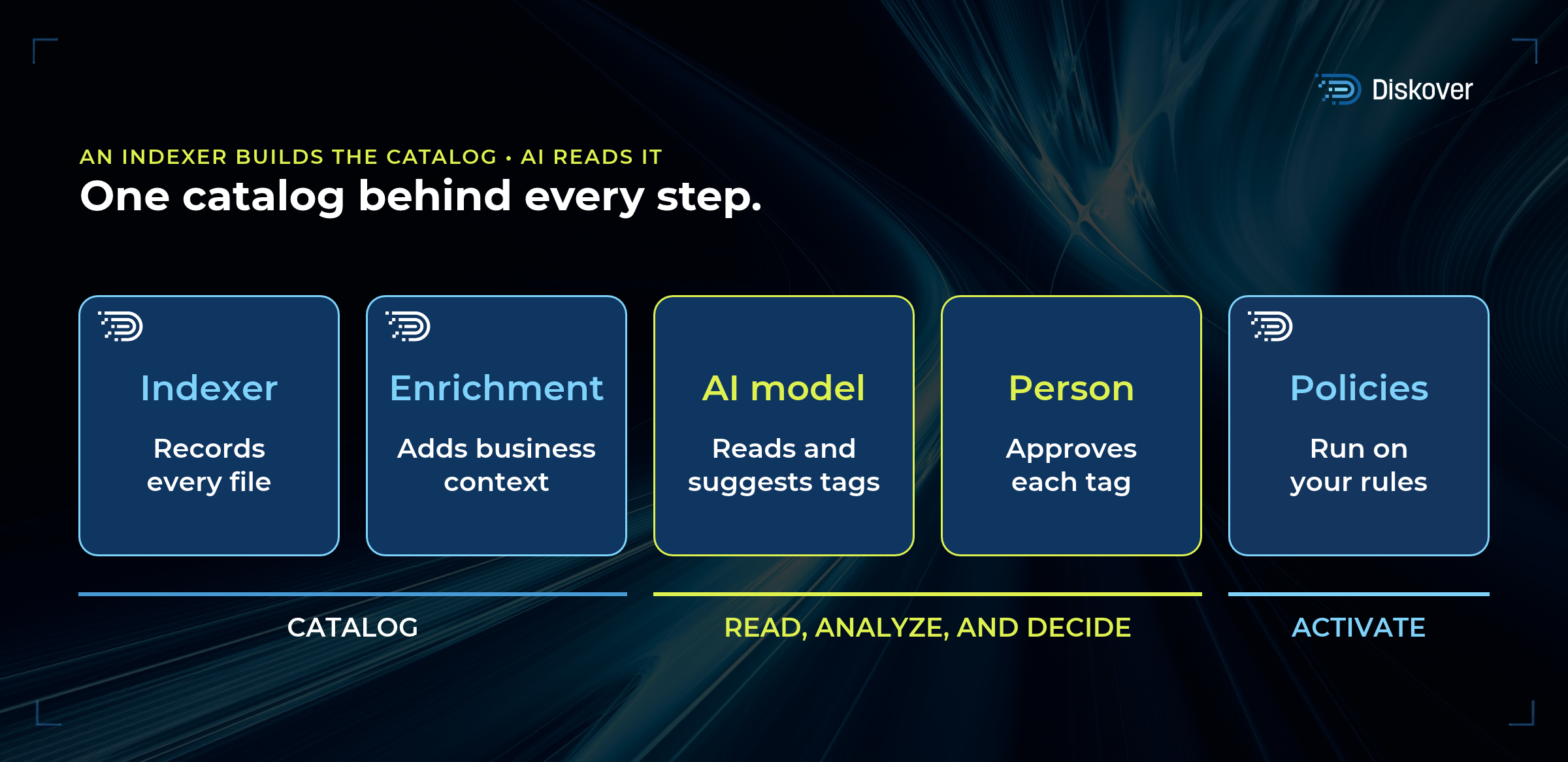
AI reads the catalog and answers in plain language.
Once the catalog exists, AI is the fastest way to use it.
In Diskover, the AI Connector links the AI tool your team already uses, such as ChatGPT, Claude, or Microsoft Copilot Studio, to the catalog through the Model Context Protocol (MCP).
You ask a question the way you would ask a colleague, and it searches every record, with the same group permissions and audit trail as the Diskover interface. The AI Connector is optional, and your team can run the same searches directly in the interface.
How many of the pathology lead’s questions start as a ticket to information technology (IT) and end three days later with a partial list?
With the catalog in place, she asks in the meeting and gets the list there, with the owner and scan date on every file. AI turns a complete catalog into plain-language answers, with a recommended next step, for anyone with access.
Tags come from people, rules, and AI.
A tag records a decision about a file, such as approved, archive candidate, legal hold, or ready for a training set. Every workflow reads the same tag, so one decision drives each step that follows. Each one comes from one of three sources:
- People. Authorized people add tags directly in the Diskover interface.
- Rules. Rules add tags automatically when a file matches a condition, such as a path, an age, or an owner.
- The AI Connector. It returns the matching files with a suggested tag. A person approves the suggestion, and then Diskover tags the files. AI-assisted, human-approved.
Who decided that last year’s rescanned slides were archive candidates?
A named person, who approved the recommendation, with the decision recorded in the audit trail. AI proposes how a file is described, and a person decides what that description sets in motion.
Policies run on the rules you set.
In Diskover, curation and orchestration policies read the catalog on a schedule and act on the files that match their conditions.
They tier cold files, archive completed projects, deliver a curated set to the training pipeline, or delete files at the end of their retention period, with every action recorded.
This part of the work is rule-based. A policy states its conditions, such as an age, a path, an owner, or a tag, and applies them the same way to every file on every run. At the end of the study, every slide tagged for archive moves to the archive tier on Sunday night, and the scans stay searchable in the catalog after the move.
Which storage decisions on your team still wait for someone to run a script?
Those are the decisions a policy can carry out, once the catalog knows which files they apply to. Diskover catalogs your files, and its policies act on them.
So, can AI catalog metadata?
Not on its own. The table sets out who does what.
| THE JOB | WHO DOES IT | WHAT IT PRODUCES |
|---|---|---|
| Record every file | The Diskover indexer | One record per file, refreshed on a schedule |
| Add business context | Diskover rules and enrichment plugins | Fields such as project, study, owner, and status |
| Answer questions | An AI model, through the Diskover AI Connector | Matching files with a suggested tag |
| Decide | A person | Approved tags that workflows act on |
| Act on files | Diskover policies, on your schedule | Tiering, archiving, delivery, and cleanup, with an audit trail |
| Read file contents | A model in your AI pipeline | Summaries and labels for the selected set |
Start with the catalog, and every AI tool your team adds later reads the same records from its first question.
This video shows the same approach with Snowflake Horizon as one example: Diskover catalogs every file where it lives, and the metadata feeds the tools your team already uses.
KEY TAKEAWAY
Catalog first, then ask AI.
- An indexer builds the catalog, one record per file, refreshed on a schedule. AI reads that catalog.
- AI answers plain-language questions and recommends a next step, such as a tag. A person approves it, and Diskover policies act on files by the rules you set.
- Models that read file contents work best on the set the catalog selected, so compute goes to the files that matter.
Give your AI one catalog it can trust.
Diskover indexes every file across every vendor, tier, and location into one metadata catalog, so your AI tools answer from complete records.