

BLOG · MEDIA AND ENTERTAINMENT
Finished shows are still on your fastest storage.
November 16, 2026 · ~5 min read
The renewal quote for your tier-one storage arrives on Monday, and finance wants one answer before anyone signs: which finished shows are still sitting on it, and what can move?
The season wrapped months ago. The conform, the graded masters, and three versions of the deliverables still share folders with proxies and render passes the team will never open again.
Media storage costs are the yearly cost of keeping every camera original, master, proxy, and render on the storage tier where it sits today. Most of that bill comes from files that kept their place because sorting them felt risky, rather than from work in progress.
The fix starts with a question every media team can answer about a single file: can it be rebuilt?
Every media file falls into one of three groups.
Value in a media estate follows one rule. A file that captured something once is irreplaceable. A file that software produced from another file can be produced again.
| GROUP | EXAMPLES | CAN IT BE REBUILT? | WHAT TO DO WITH IT |
|---|---|---|---|
| Crown jewels | Camera originals, graded masters, deliverables, project and edit files | No | Protect it first, then move finished work to an archive tier |
| Regenerable | Proxies, transcodes, renders, scratch | Yes, from the source | Keep what active work uses, clear what has gone stale |
| Trivial | Caches, failed or partial transfers, empty files | Not needed | Remove it |
Camera originals and graded masters are the files a studio can never shoot or grade again. Proxies, transcodes, and render passes come from those sources, so the team can regenerate them on demand. A partial transfer left behind by a failed upload holds no usable media at all.
When your editor asks whether a folder is safe to clear, which group does it belong to?
That one answer decides the action. The difficulty is answering it across millions of files, on many storage systems, before the renewal date. That is the daily work of media and entertainment data management, and it starts with knowing which group each file is in.
Finished work stays on fast storage because moving it feels risky.
Finished shows stay on tier-one storage for a reason. The proxies, the renders, and the masters live side by side, and a cleanup that deletes the wrong file costs a reshoot or a regrade. So the safest choice is to leave everything where it is.
The pattern is measurable. CTERA reports that 88.3% of files had not been accessed in more than a year, across the file shares it scanned. In a media estate, much of that idle capacity is finished work: delivered, approved, and still billed at the fastest-tier rate.
Sorting by metadata takes the risk out of the decision. Every media file carries clues in its extension and its path. A graded master is an .mxf, .mov, .dpx, or .exr file inside a folder such as /graded/, /conform/, /final/, or /imf/. Rules that read those clues classify the whole estate from metadata alone, so the media stays closed and in place.
Media storage costs grow with every undecided file.
Every terabyte (TB) of finished work on fast storage is capacity you already paid for and cannot give to the next show. That matters more this year than last. TrendForce reports that enterprise solid-state drive (SSD) contract prices rose about 80% in the first quarter of 2026 alone.
In Diskover’s demo media estate, masters and deliverables are the largest group, and 45% of that group has gone cold. That is finished work, still on primary storage. The demo uses sample data, so read it as an example of what the dashboard shows, not as a benchmark. The CTERA figure above shows the same pattern in real file shares. Your own numbers will differ, because the age at which data counts as cold is a setting each team chooses.
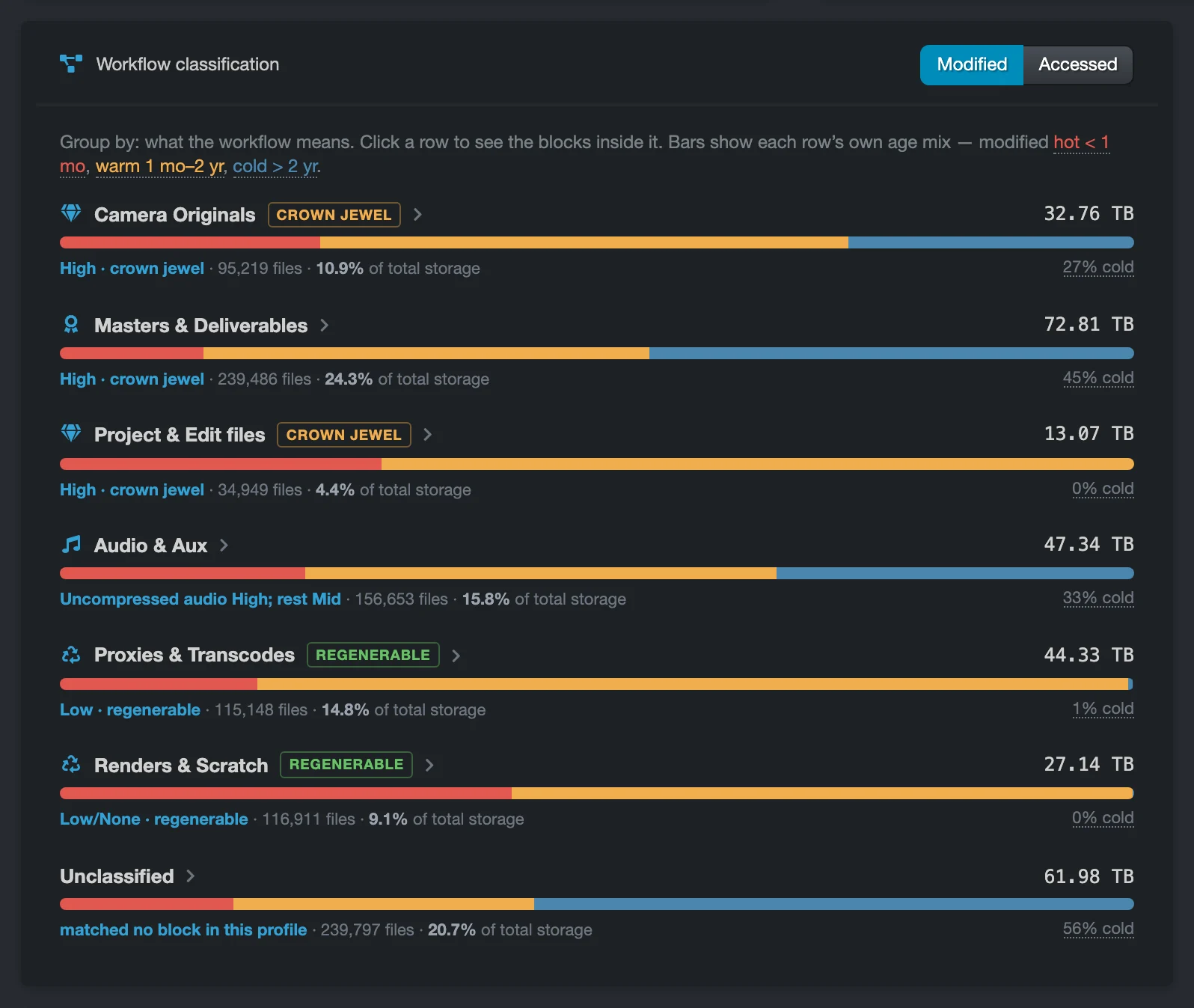
Which finished shows are still on your fastest storage today?
The answer comes from two facts the file system already records: what each file is, and when it was last changed or opened. Combine them, and a team can see show by show which crown jewels are cold enough to move to an archive tier. That is where media storage costs start to come down without putting a single original at risk.
Rebuildable files are the safest place to start.
Regenerable files are where a cleanup can begin without debate. A proxy that feeds an active edit stays. A render pass from a show that delivered last year can be rebuilt from its source the day someone needs it again.
Age makes the split. Regenerable files changed within your warm window are still in use. Regenerable files older than your cold age are stale, and stale regenerable media is the safe reclaim case.
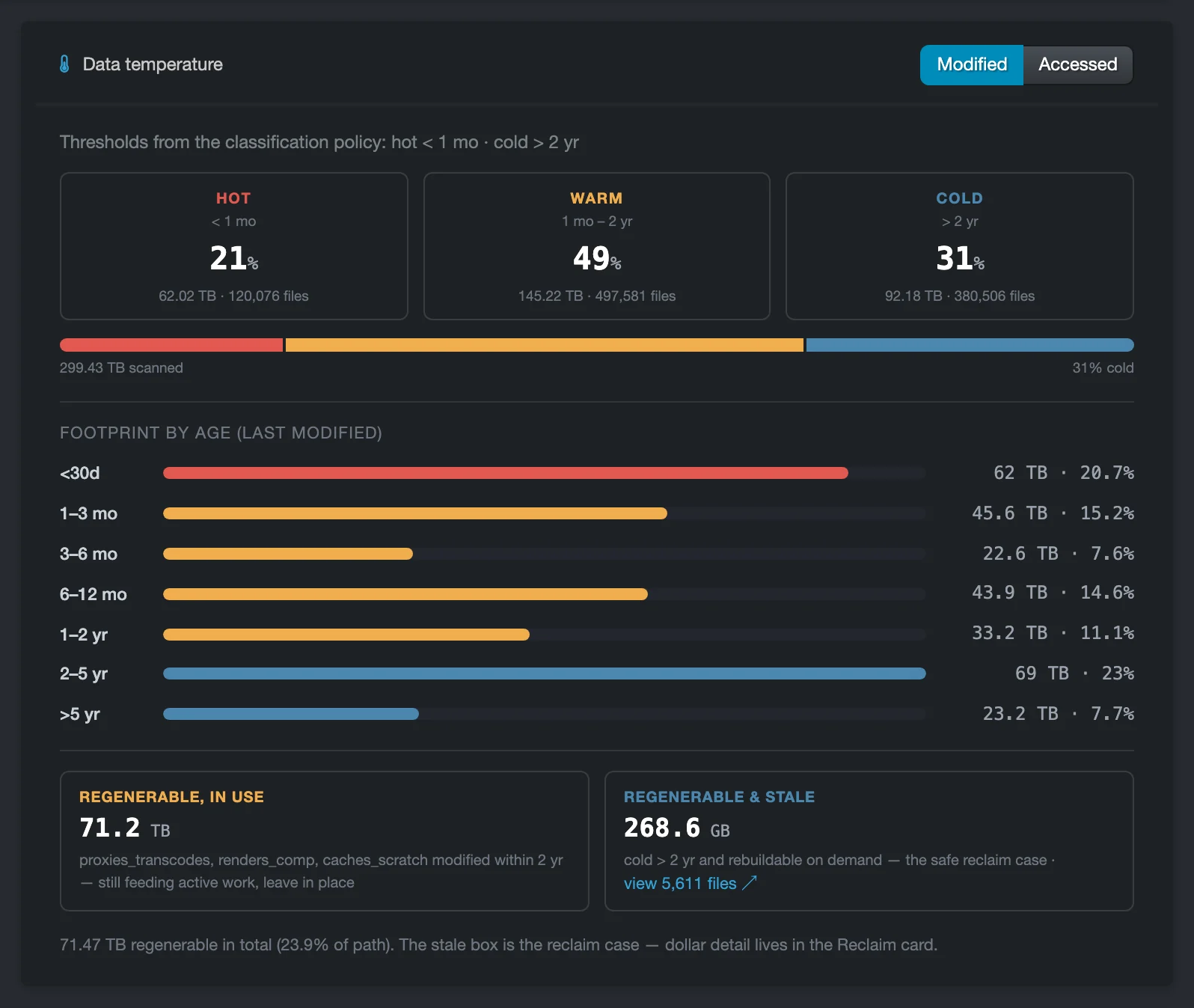
Trivial files are simpler still. In the demo estate, 17.1 TB is trivial data, most of it caches and failed or partial transfers such as .partial and Aspera files. Each one holds space and no usable media.
Clearing these first frees capacity and builds the team’s confidence before anyone touches a camera original.
Ownership puts a name on every part of the bill.
Media storage is shared by staff, freelancers, and departments, so the bill rarely has a single owner. Sound, color, visual effects (VFX), and editorial each add their own working files, show after show.
Ownership data changes that conversation. When a report lists which teams and groups hold the most space, a producer sees what a show still costs to keep, and finance plans the next purchase based on measurable growth. Capacity and file count over time show how fast each part of the estate grows, scan after scan.
Who pays for your storage? Ben McDonald shows chargeback and showback in Diskover (1 minute).
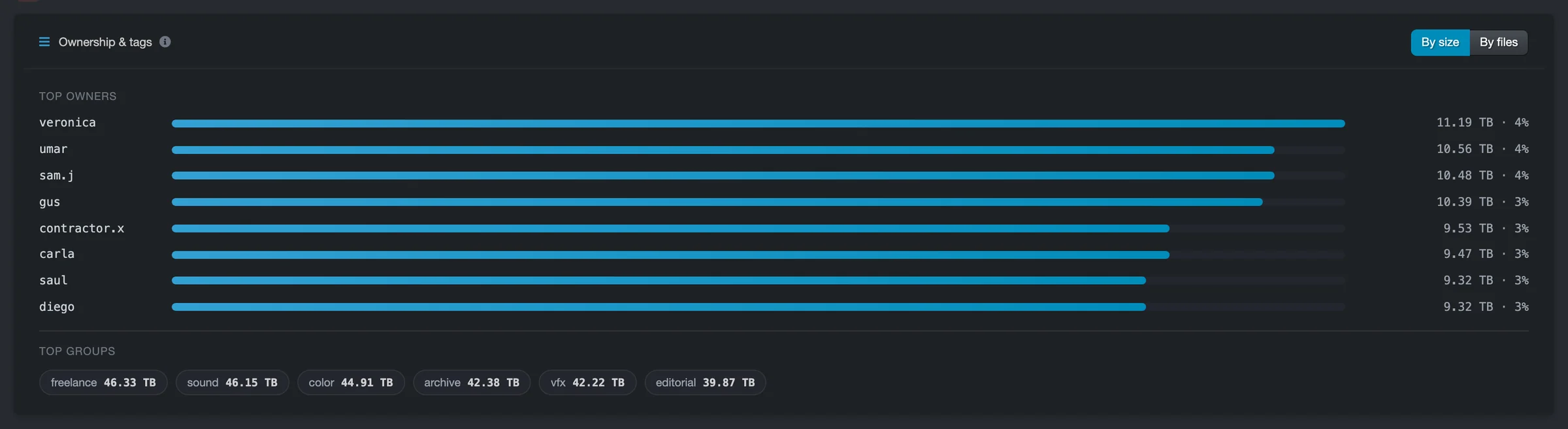
Who on your team could say today which department added the most storage last quarter?
That answer turns media storage costs from a shared overhead into a line each team can act on.
The Insights dashboard puts every answer on one screen.
Diskover answers these questions in the new Insights dashboard. An administrator chooses the Media and Entertainment profile, and after the first scan, the dashboard groups the whole estate by its role in production, from camera originals and masters to proxies and renders, each with a value tier and its age mix.
Five numbers lead the page: total size, crown jewels, reclaimable spend per year, cold data, and annual cost. A data efficiency score out of 100 combines hygiene, waste, and risk, and the dashboard describes it as a guide, not an audit. Top actions then ranks each fix by its size, its yearly cost, and the points it adds to the score.
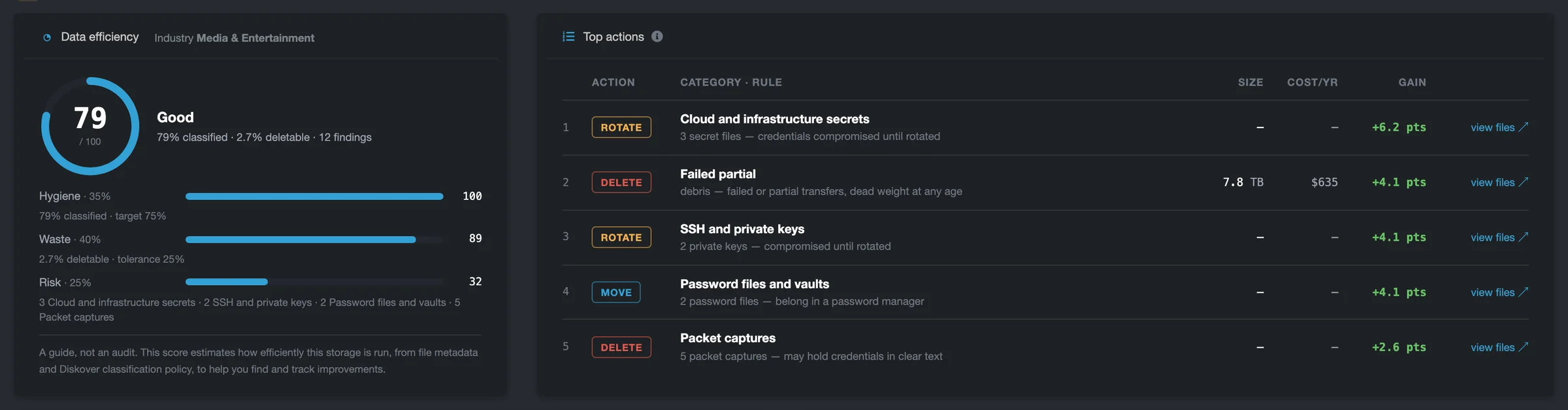
The dashboard shows what to do, and Diskover policies do it. A policy can tier a finished show to archive storage or clear stale renders on the schedule you set, with every action recorded. The data stays in place while the catalog is built, and it moves only when a policy calls for it.
At scale, the results add up. One entertainment leader indexed 260 petabytes (PB) of media with Diskover, reclaimed 8 PB, and saved $10M.
KEY TAKEAWAY
Value decides where media lives.
- Camera originals, masters, and project files cannot be recreated, so protect them before any cleanup.
- Proxies, renders, and scratch files can be regenerated, so the stale ones are the safe place to reclaim space.
- Extension, path, and age are enough to sort a media estate and decide what moves.
See what every show still costs to store.
The Insights dashboard sorts your media by what it is worth and ranks what to fix first. Start with a 30-day proof of concept on your own data.