

BLOG
How to inventory a data estate you did not build.
September 29, 2026 · ~8 min read
You inherited the file shares. The engineer who set the naming convention left in 2019, the project behind the largest folder was canceled, and the share named “current” has not been written to since the last reorganization. Now finance wants to know what is sitting on all that storage, and why the bill keeps going up.
An unstructured data inventory is a catalog of every file across every storage system, built from metadata rather than from file contents, that records what exists, who owns it, and when it last changed. It is the first thing to build and the thing most programs skip, because describing what you already own feels less urgent than buying more room for it.
Files accumulate faster than anyone describes them.
What follows is the order to do it in.
Decide what the inventory has to answer.
An inventory built to be complete never finishes. An inventory built to answer three questions is finished when those three questions have answers. Indexing itself is fast. Agreeing on what the inventory is for is the part that takes a conversation, so have that conversation before the first scan and let it set the scope.
Most teams are accountable for some version of these:
- What can move to a colder tier before the next purchase order.
- What falls outside the retention policy the company already wrote.
- And what belongs to people who left.
Each one is answerable from description alone, without opening a file. The third is the one teams underestimate, since orphaned and abandoned data accumulates quietly.
In a post house, that first question is concrete: which of last season’s dailies and proxies are still on the tier that costs the most, and which show they belong to.
In a chip design group, it is which verification and tape-out output from closed projects still sits on the fastest storage, and which product line it belongs to.
In an exploration team, it is which seismic surveys have not been touched since the last interpretation cycle, and which block they cover.
In a research group, it is which sequencing output from closed studies is still on premium storage, and which study produced it.
Which three questions would make your next budget conversation easier, and could you answer any of them today?
Six fields carry most of the decisions.
The instinct is to collect everything describable about every file. The better move is to start from the base set Diskover records for every file, shown below, because a small set that covers the whole estate beats a rich set that covers one share.
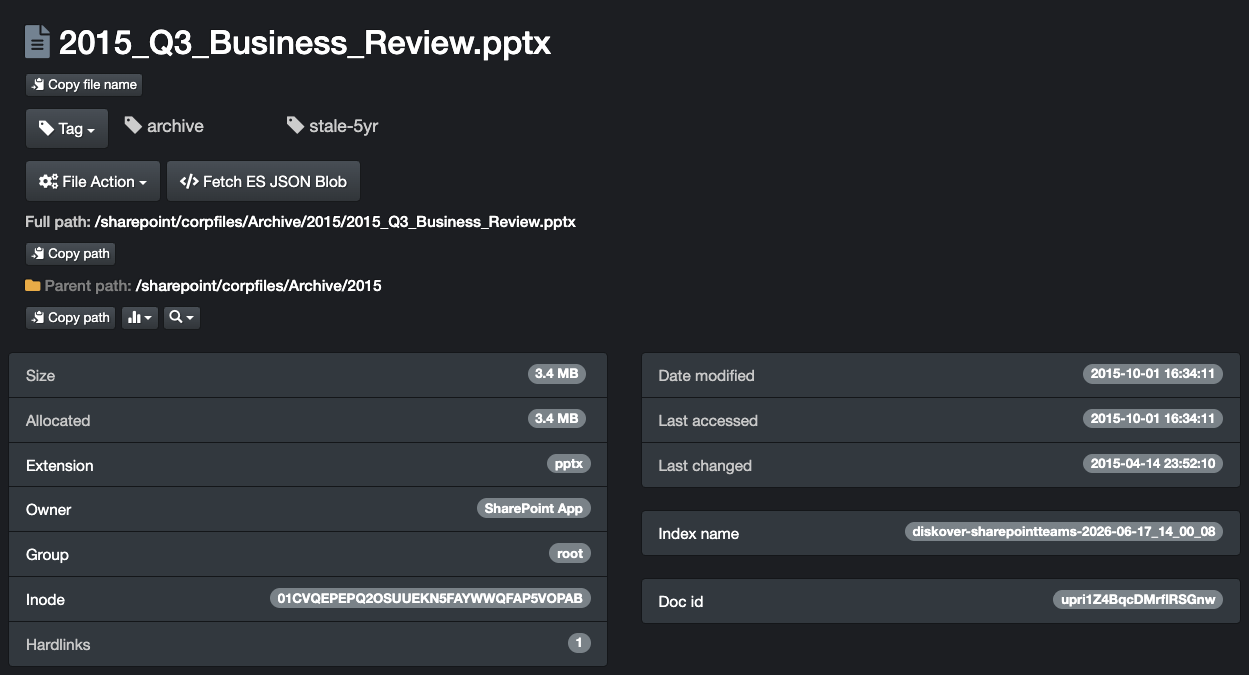
These are file metadata fields, the ones the storage system already keeps, which is why they can be read across billions of files without opening any of them. How long would it take to produce those six fields for one share with the tools you have today?
| FIELD | WHAT IT LETS YOU DECIDE |
|---|---|
| Full path | Which share, which project, which team. Path is the strongest proxy for purpose you will get without opening a file. |
| Size | Where the capacity actually sits. Capacity concentrates in the largest files, which is where a tiering decision starts. |
| Owner | Who to ask. An unowned file is a decision waiting for someone to claim. |
| Last modified time | Whether the data is live work or settled history. This is the field that drives tiering. |
| File type | What the file is for, and which team’s vocabulary applies to it. It is also how temporary output, cache files, and intermediate renders get identified as a group, so they can be cleared on a rule rather than one at a time. |
| Storage system and tier | What each copy costs to keep, and what moving it would change. |
Two notes on the fourth row, last modified time, because it is the one that misleads people. Last-access time looks like the better signal for stale data and is the worse one, since backup jobs and virus scanners touch files and reset it. Last-modified time survives that. And timestamps get corrupted at scale, so any honest inventory returns files dated before the first computer and files dated a century out. Those are a data quality signal, not a bug in the count.
Record the systems you cannot reach yet.
Every inherited estate contains storage whose owner has left the company. A filer in a branch office, an archive appliance from an acquisition, a share whose service account expired. The temptation is to leave these out of the inventory until access is sorted, which quietly turns an unknown into an omission.
That difference matters. An unknown is a work item with a name on it, and someone can go and close it. An omission stays out of view until it causes a problem, usually as a share full of data that was never in the budget, or a retention answer that turns out to have covered less than everyone assumed.
Put them in the inventory as rows with what you do know: the system, its capacity, its last known owner, and the reason it is unreadable today. A named gap is a work item someone can close. An unnamed gap reappears as a surprise during an audit, in the week you have the least time for it.
This is also where the inventory earns its credibility. When a life sciences team asks where every sample from a 2021 assay went, “16 systems indexed, two pending credentials, here they are” is an answer. “We found 40 files” is not an answer, because the person reading it cannot tell whether that is 40 out of 40 or 40 out of 4,000.
How many storage systems could you name right now, and how sure are you that the list is complete?
Add the context the file system does not store.
A file knows its owner only as a username. Your employee directory knows the rest: the department, the business unit, and whether that person still works there. Match the two, and every file in the unstructured data inventory now carries its owner’s department alongside its own size and age.
The legal team’s hold list works the same way, and in Diskover it is a tagging step. Match the list against the catalog on a field the two share, usually the username or the path, then write the result onto each matching file’s record as a tag.
The tag travels with the file through every later search, so a policy can be set to leave tagged files alone, and a report can show exactly what is under hold without anyone rereading the original list.
Those tags are what make a later removal defensible. A file shown to be past its retention rule, outside every hold, and owned by a department that approved the decision can be cleared with the evidence attached.
That context lives in the directory rather than on the file, which is exactly why it is worth adding. This is the step that turns a file listing into an enriched metadata catalog, and it is what lets you ask a question in business terms rather than in paths.
The directory is only the first source. Once the base set is recorded reliably across the estate, plugins extend the catalog with fields drawn from the systems your teams already run and from the formats the work arrives in. Worth planning after the inventory answers its three questions, rather than before.
The practical test: can you produce, for one business unit, every file over 100 gigabytes (GB) that its former employees own? That query is answerable in seconds once ownership is enriched, and it stays unanswerable forever if it is not.
One unstructured data inventory, rather than one per vendor.
Most estates get inventoried the way they were bought, which means one report per storage system, each in its own format, each current on a different date. Put side by side, two of them describe the same file and disagree about it.
They disagree because each report was produced on a different day, and because each system counts differently.
- One reports what a compressed volume stores, another reports what it holds.
- One counts a snapshot as a separate file, another treats it as the same file.
- One measures age from the last write, another from the last backup.
So the meeting turns into a discussion about the spreadsheets rather than about the data.
When two reports disagree about the same share, which one does your team treat as true?
The fix is structural, and it is what a metadata catalog is for. Index every system into one catalog, with one schema and one set of field definitions, so a file stays findable wherever it sits and a single question reaches every vendor, tier, and location at once. The data stays in place while the catalog is built, and it moves only when a workflow calls for it.
The Sisense State of Analytics survey of 500 organizations found that 76% had made business decisions without consulting available data, because getting to it was too difficult. Fragmented inventories are one reason the data stays out of reach.
Know when the unstructured data inventory is good enough to act on.
Completeness is the wrong finish line.
The inventory is ready when it can answer the three questions you wrote down in the first place, for the systems that hold most of the capacity, with the gaps named.
That threshold arrives long before the last share is indexed, because capacity is never spread evenly across an estate. A small number of systems hold most of it, and once those are described, the answers stop moving as the smaller shares come in.
From there, the inventory stops being a document and becomes something you query. Sitting on the catalog, the AI connector answers questions in plain language: ask which files have not been touched in two years and are still sitting on the fastest storage, get the matching files back with a recommended action attached, and approve it before anything happens to a single file. AI-assisted, human-approved is the whole arrangement.
Then put it on a schedule, because an inventory describes a moment. Indexing repeats on its own, the catalog updates in place, and the saved searches you wrote the first time answer themselves each cycle without anyone rebuilding them.
The second pass is where the value compounds, since the difference between two dates tells you what grew, what went cold, and what appeared in a share that was supposed to be closed. Weekly suits an estate under change, and a settled archive can run far less often. The index cadence and the review cadence are different questions, and only the second one needs a person.
KEY TAKEAWAY
Three questions, not every file.
An inventory built to describe everything stalls.
An inventory built to answer three named questions finishes, and it finishes in time to change a budget.
Write the questions first. Record six fields across the whole estate. Name the systems you cannot reach yet, and put the second pass on the calendar.
Know what you have before you buy more.
Diskover indexes every file across every storage system into one catalog, so your team can see what exists, who owns it, and what it costs to keep.