

PLUGINS SUITE for MEGS | MEDIA, ENTERTAINMENT, GAMES & SPORTS
From ingest to archive—plugins that know your media.
Diskover offers a rich plugin ecosystem tailored for MEGS workflows, helping some of the world’s largest media corporations cut costs and maximize efficiency across teams and infrastructure.
Metadata enrichment for supercharged control and performance.
Workflow automation tools for optimized efficiency.




Media Info.
Uncover, analyze, and automate using the hidden intelligence inside your media assets.
Pushing the boundaries of searchability and accuracy, the Media Info plugin enriches the index with additional metadata, such as media-specific attributes (e.g., file resolution, codec, pixel format, etc.). These attributes are seamlessly integrated, making them searchable, reportable, and actionable.
If a source file lacks media attributes, those fields simply won’t be harvested or available for use within Diskover.
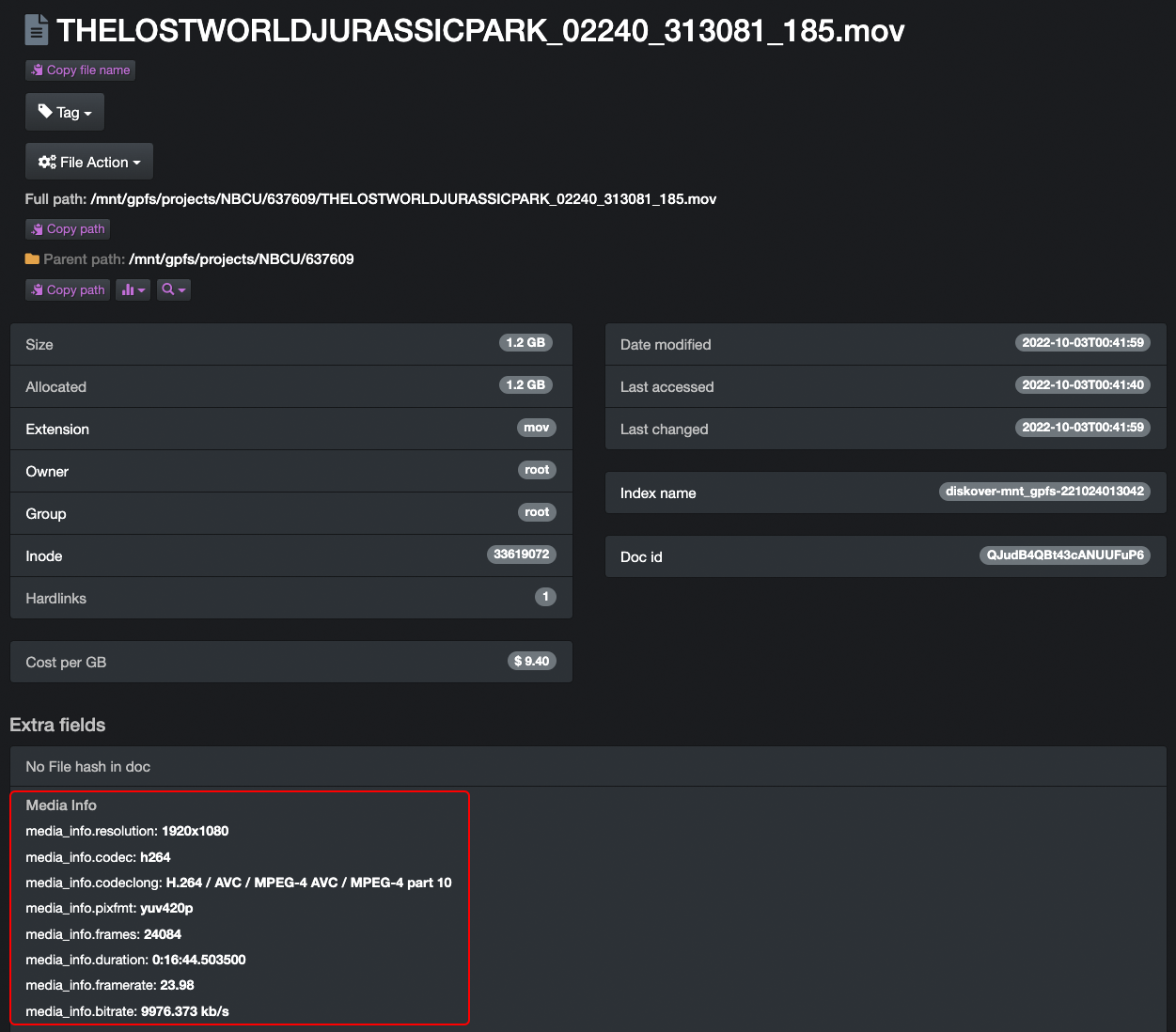
File attributes with detailed media info.
Image Info.
See beyond the pixels — uncover the intelligence inside every image.
The Image Info Plugin enhances Diskover’s global index with rich EXIF metadata, transforming standard image files into searchable sources of insight. Attributes such as resolution, color mode, device make and model, format, and software version are automatically harvested and integrated into the index — enabling advanced search, filtering, and automation across vast image libraries.
Whether for creative production, digital asset management, or quality assurance, this plugin gives users fast, read-only visibility into critical image attributes without accessing or modifying the original content.
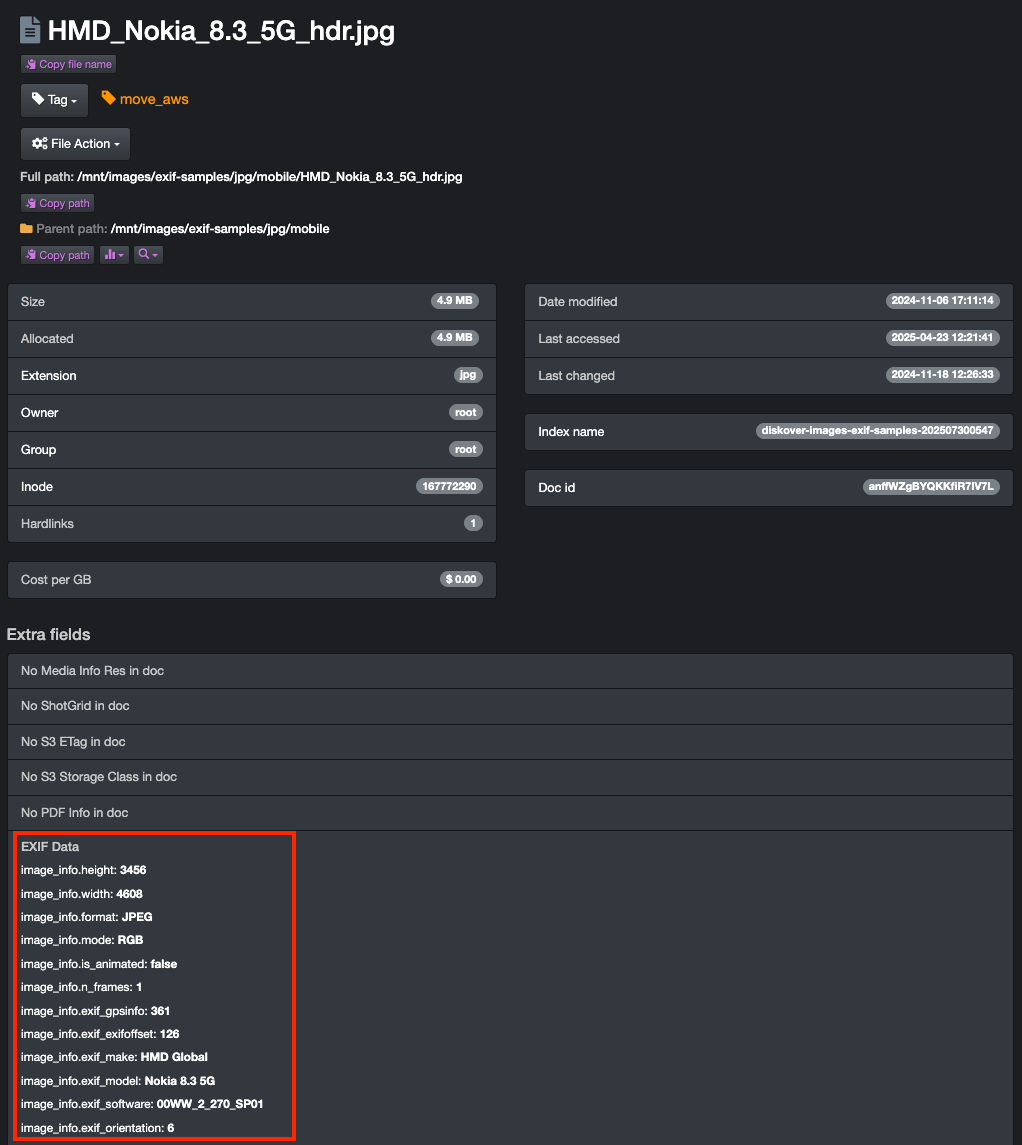
File attributes with detailed EXIF info.
OpenEXR Info.
Dive deeper into every frame — unlock the technical DNA of OpenEXR files.
The OpenEXR Info Plugin enriches Diskover’s global index with detailed metadata extracted from OpenEXR files, providing visibility into critical image and render attributes. Parameters such as channel configuration, compression type, data and display window dimensions, pixel aspect ratio, and line order are automatically harvested and made searchable.
This enhanced metadata allows creative, VFX, and post-production teams to quickly locate, analyze, and manage OpenEXR assets without direct access to production storage. By turning highly technical image data into actionable insight, Diskover bridges the gap between creative operations and data intelligence.
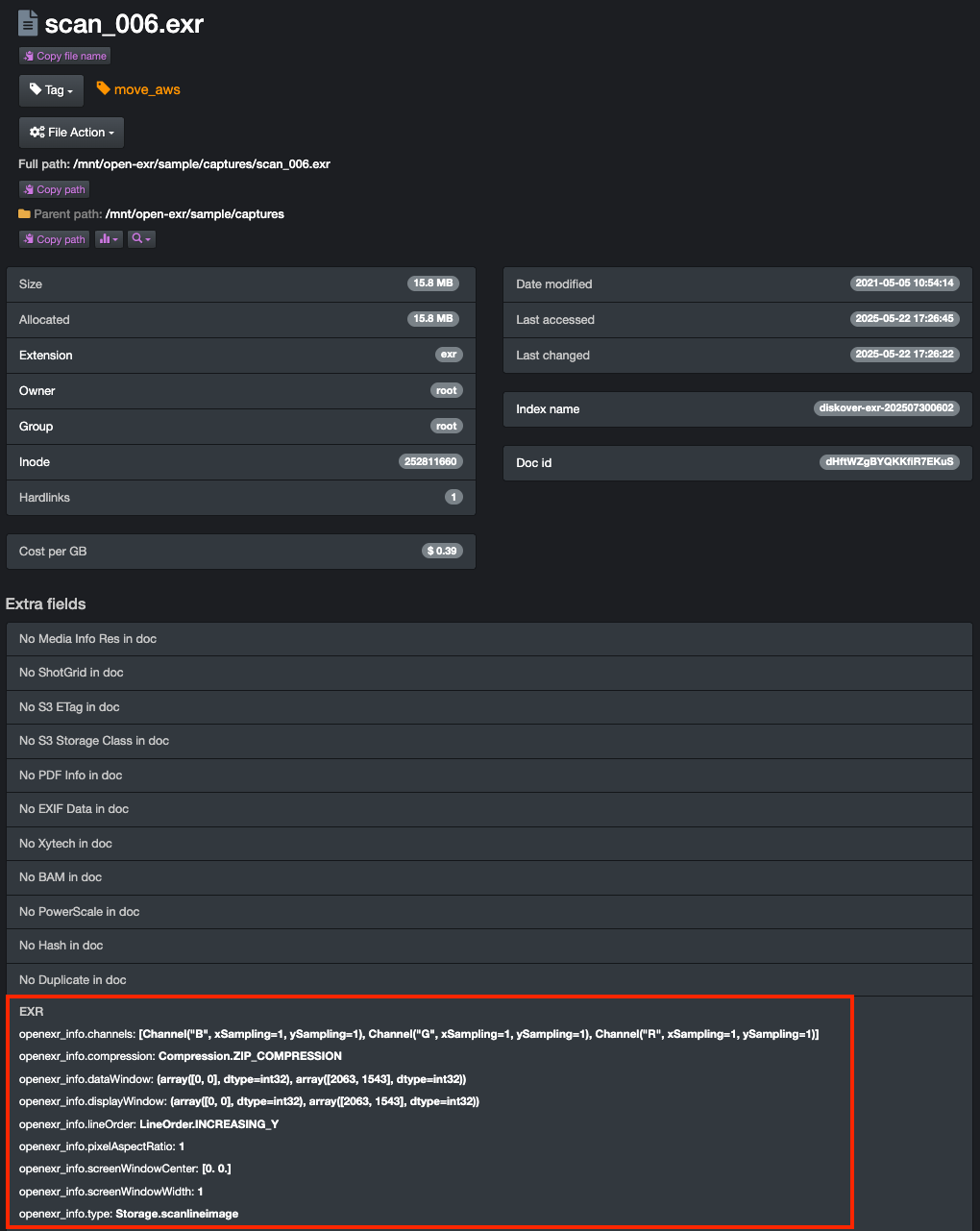
File attributes with detailed OpenEXR info.
CineViewer Player.
by

Give visibility without granting access.
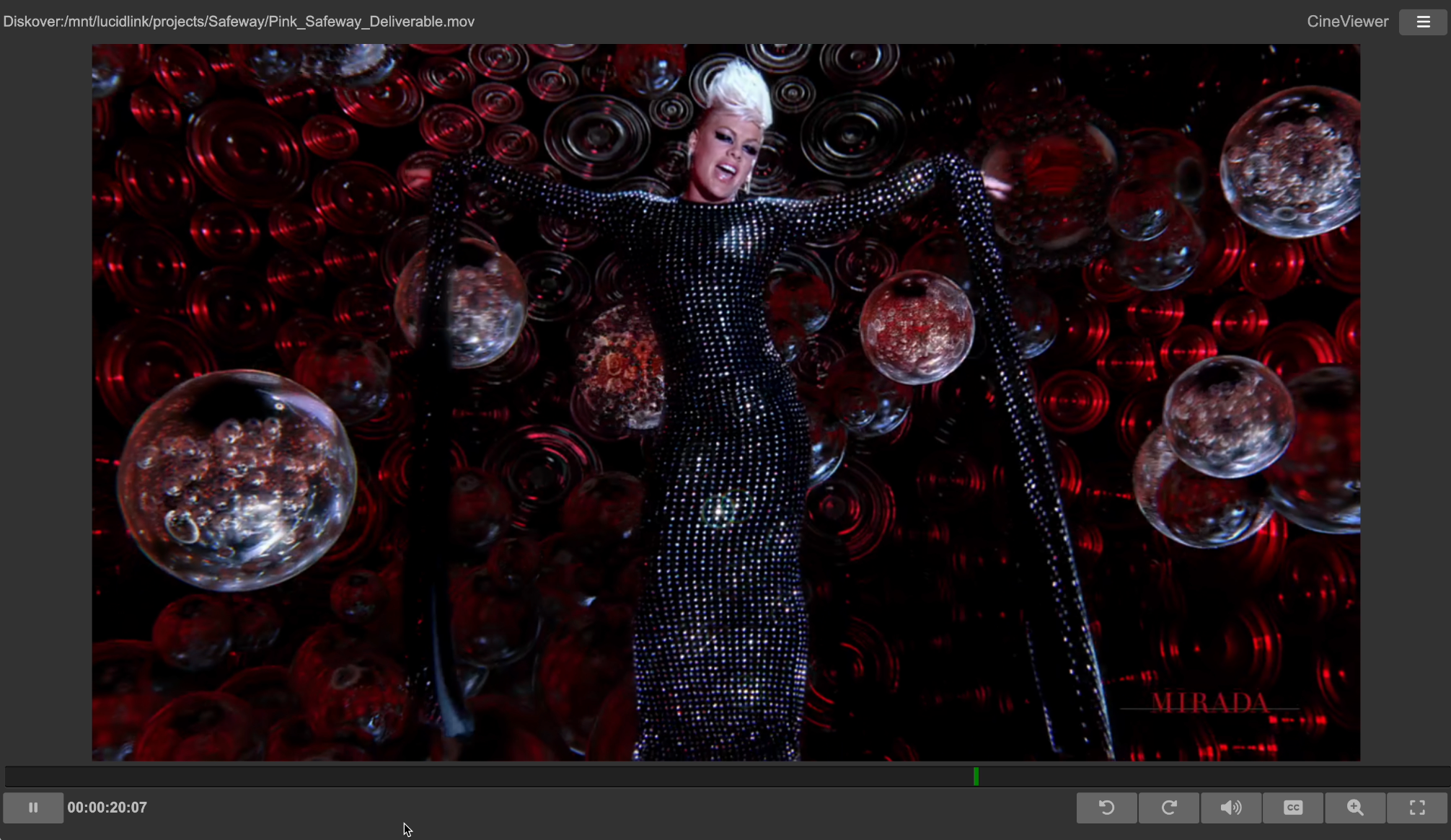
The CineViewer Player is designed to securely view high-resolution media from a remote browser without giving users access to the source files.
Through the Diskover user interface, CineViewer allows for seamless validation of media assets, therefore increasing productivity, while safeguarding your production network.
The CineViewer Player is developed by CineSys LLC, a major technological and channel partner of Diskover Data.
Single click launch from the Diskover interface.
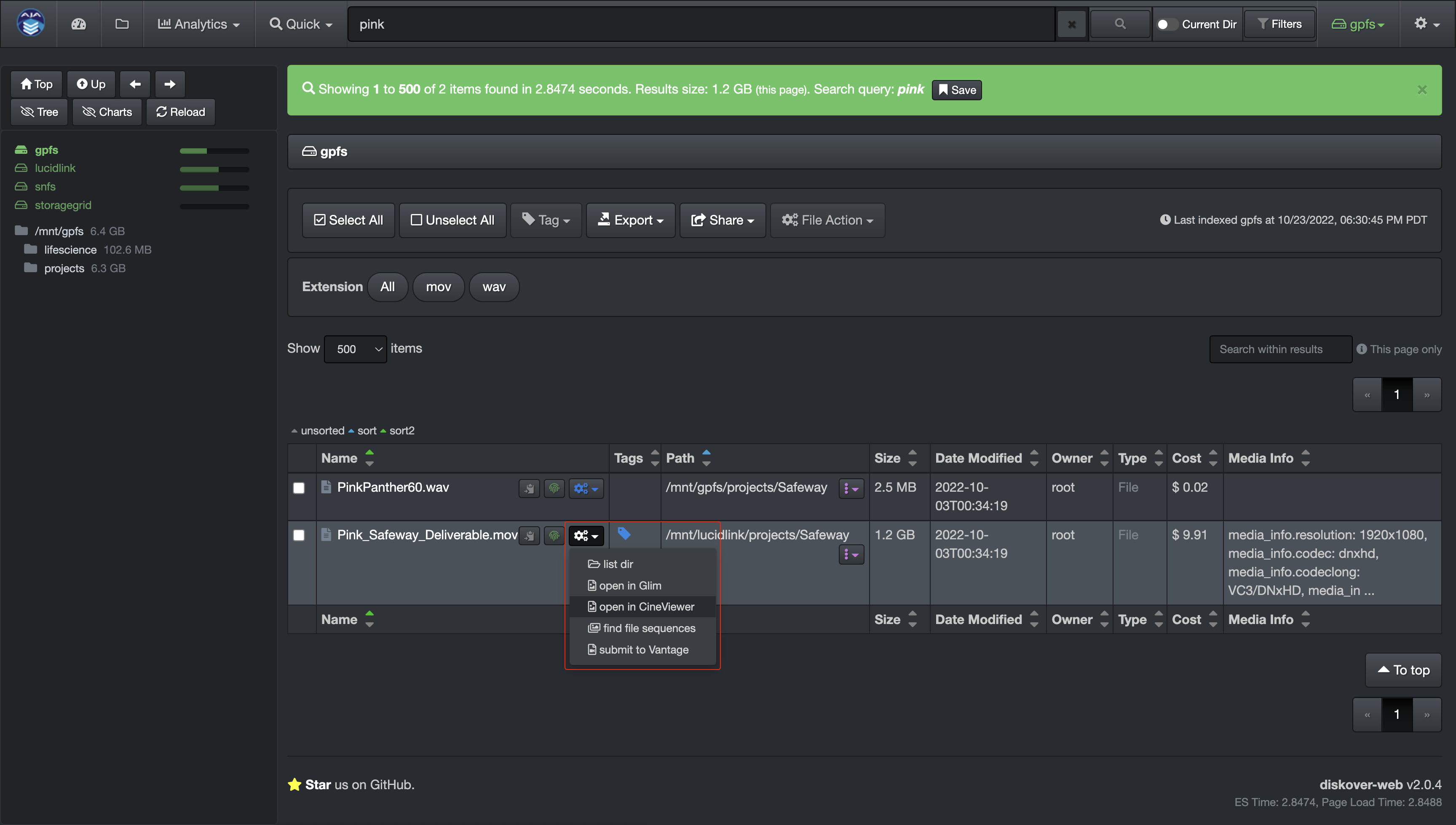
CineViewer Player user interface.
ShotGrid/Flow Production Tracking.
Formerly known as ShotGrid, a product by

A wealth of production status metadata.
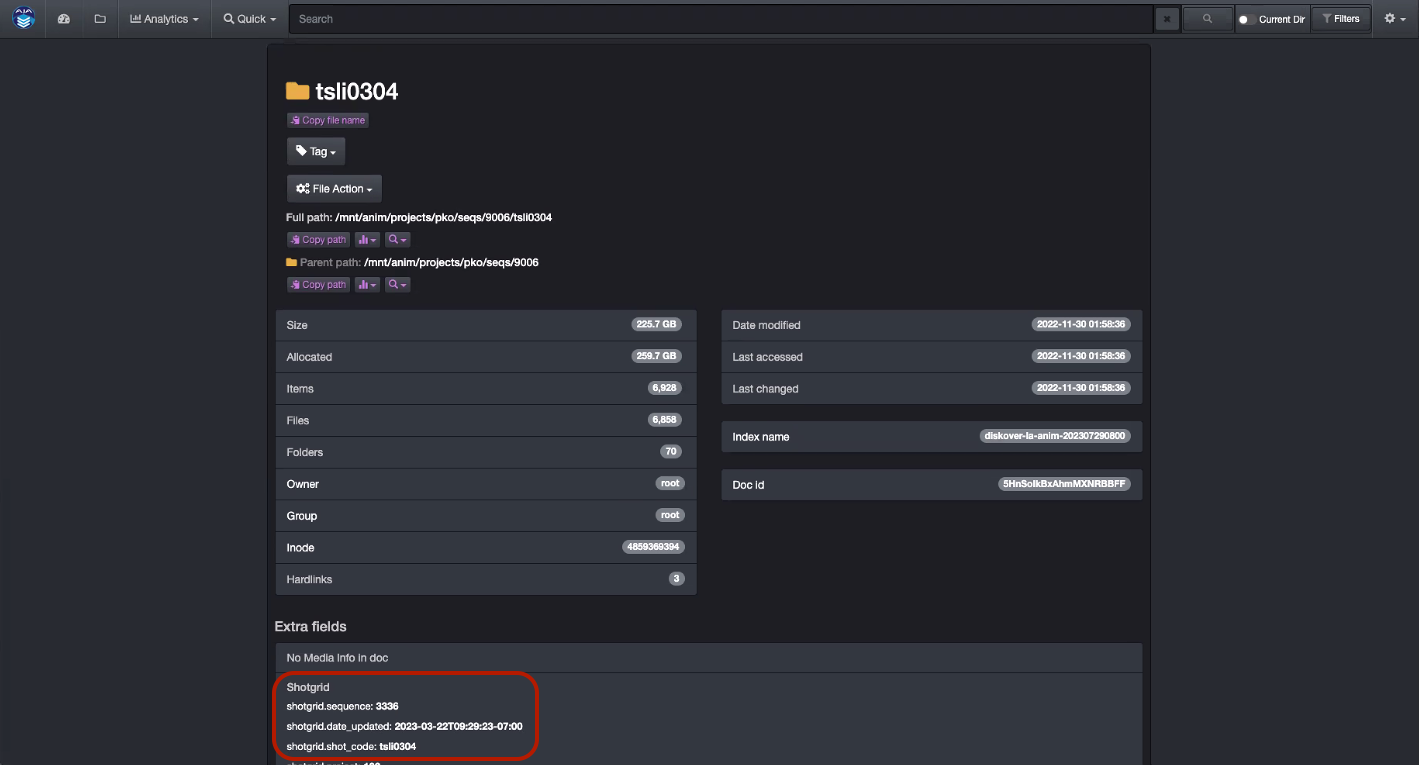
The Flow Production Tracking (formerly ShotGrid) Plugin is designed to enhance basic metadata with detailed production status information, aligning data management with production schedules. The Diskover Flow Production Tracking Plugin can harvest over a hundred attributes from the Autodesk Flow Production Tracking platform for every shot directory located on storage. These attributes become properties of the shot directories and include status information such as finaled, out-of-picture, multiple project tracking dates, and many more, totaling around one hundred indexable fields.
These searchable business context attributes enable very precise data management decision-making via granular reporting, and can easily be engaged in workflows and File Actions. A representative workflow might be to archive all shots directories 30 days after their status has been updated to finaled.
For each shot directory within Diskover, the Flow Production Tracking attributes basically become a property of that directory. All fields/metadata harvested become searchable, reportable, and actionable within Diskover.
Attributes in the Diskover user interface.
The Autodesk Flow Production Tracking platform offers over one hundred indexable fields. Users can opt to index all or just the ones relevant to their use cases.
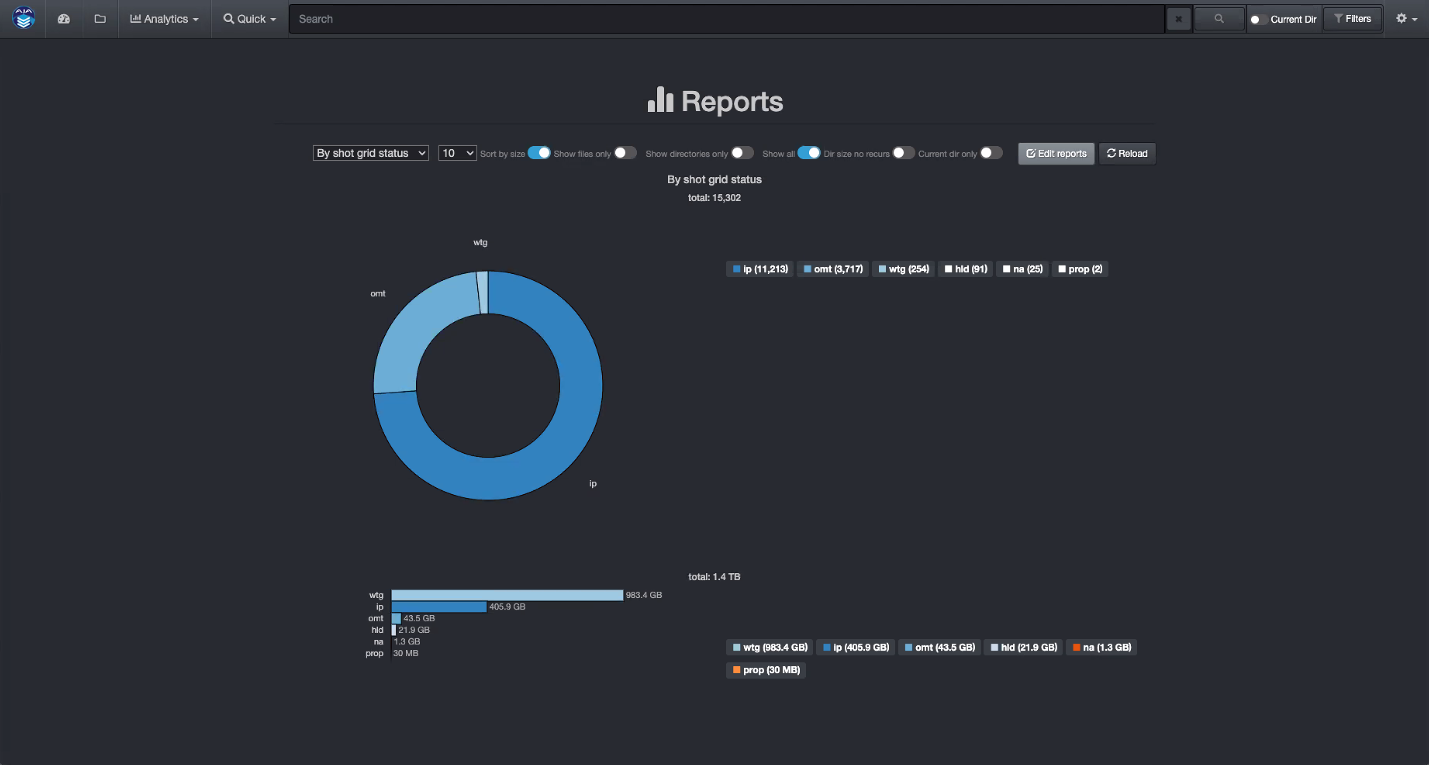
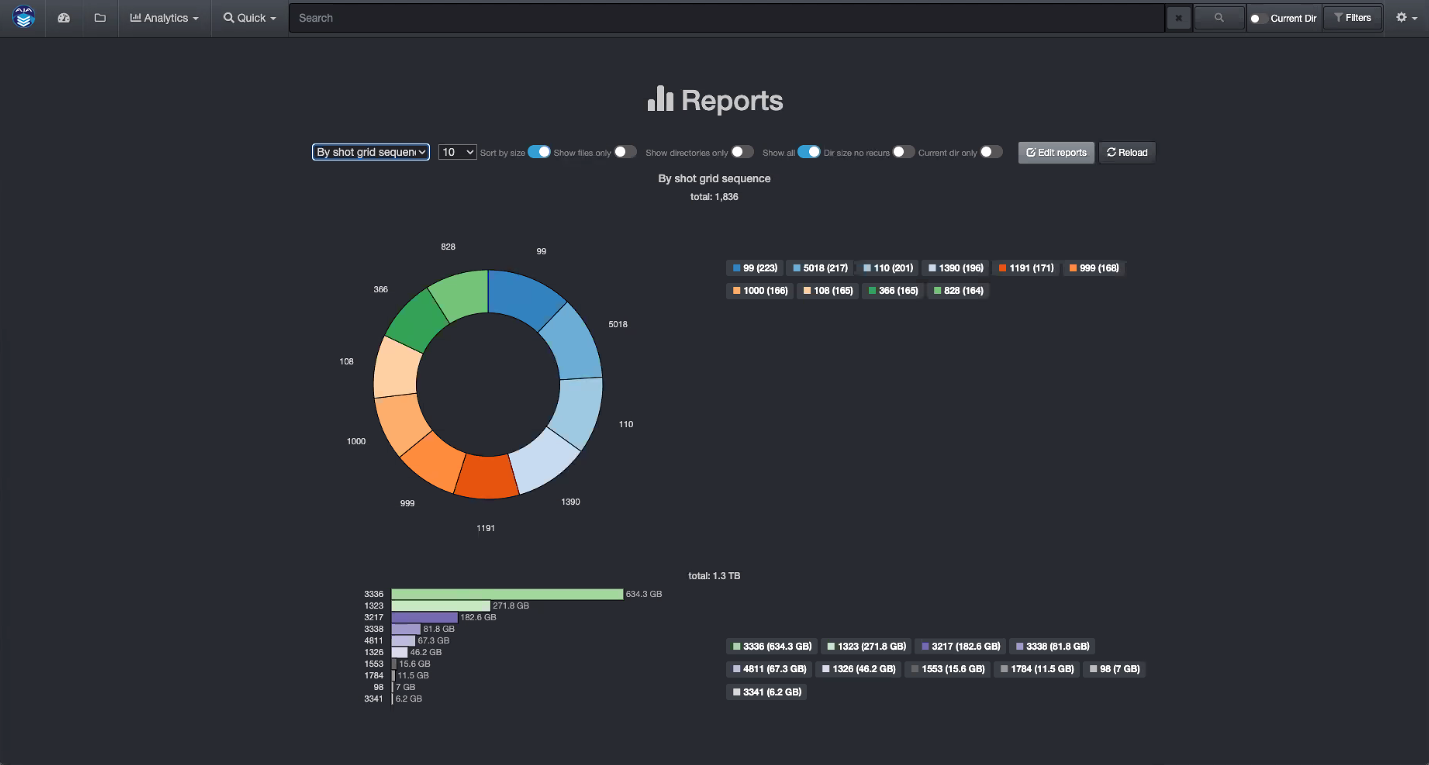
Sample of analytics using Autodesk Flow Production Tracking media-centric attributes.
By status code.
By sequence.
By creator.
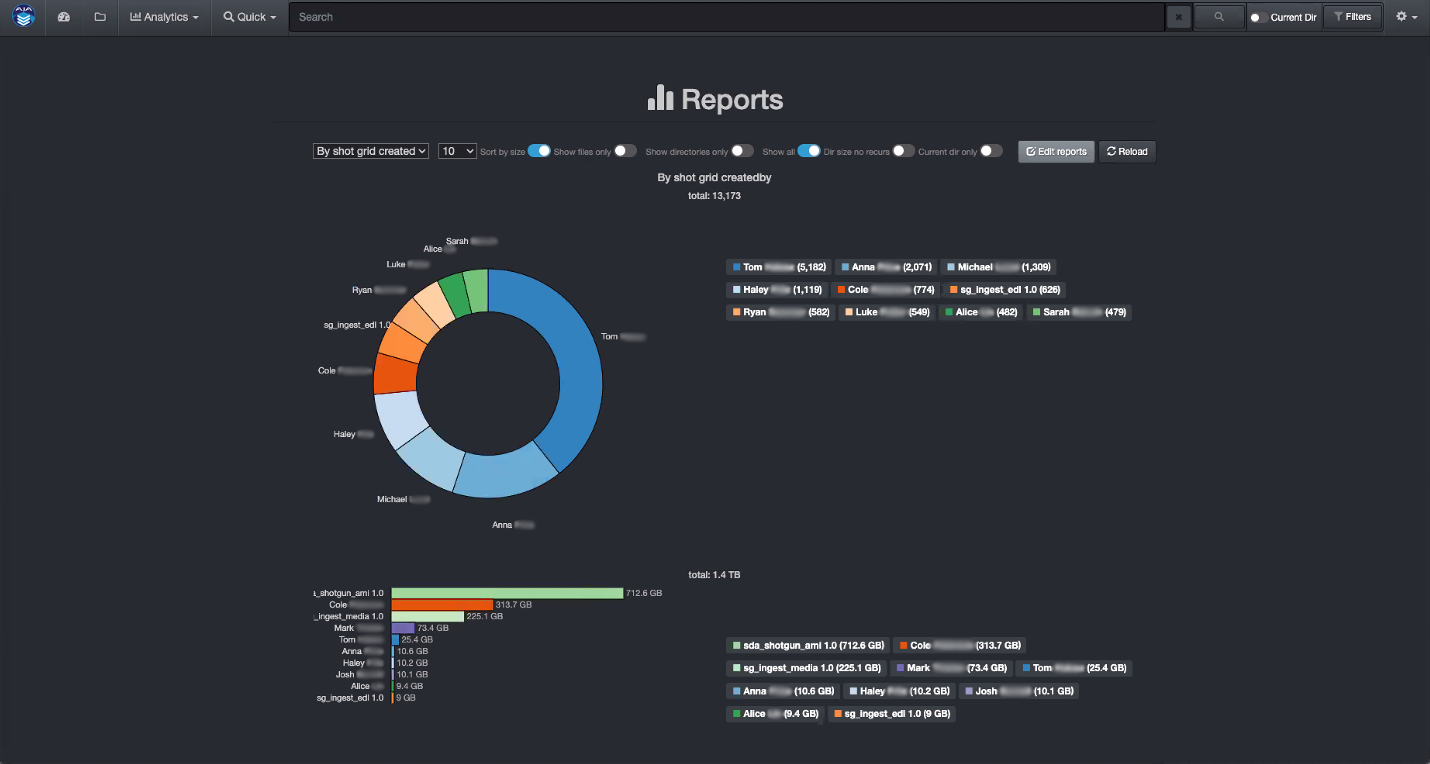
This sample showcases Diskover’s customizable analytics, leveraging order status attributes harvested from the Autodesk Flow Production Tracking platform. These enriched attributes add valuable business context to standard data, enabling users to tailor queries and gain a comprehensive, actionable overview.
Policy-driven decisions can streamline storage optimization across workflows—whether migrating inactive data to lower-cost tiers, preserving assets for long-term retention, or deleting content after delivery. Diskover’s integrated workflows make every step effortless and fully automated.
Xytech Asset Creation.
Gain visibility and searchability of all your archived media, on tape or removable hard drives.
Post facilities often have customers’ assets that have been archived and lack findability, visibility, and searchability, and therefore, the opaque nature of these assets makes them difficult to reuse or repurpose. Companies with years of such archived assets have often stored these on tape media or removable hard drives, which are frequently stored in a physical vault.
Assets were often stored on such “offline” media due to costs; however, with the advent of cloud and object storage, the economics are now making it viable to store such vaulted assets on more “online media.” Simply putting these assets onto online media does not necessarily make these assets findable in context or within the facility’s order management system.
The Xytech asset creation tool is designed to find and index newly restored online assets from LTO tapes, removable hard drives, etc., making them available, findable, and searchable within the Xytech Media Operations Platform as well as within Diskover.
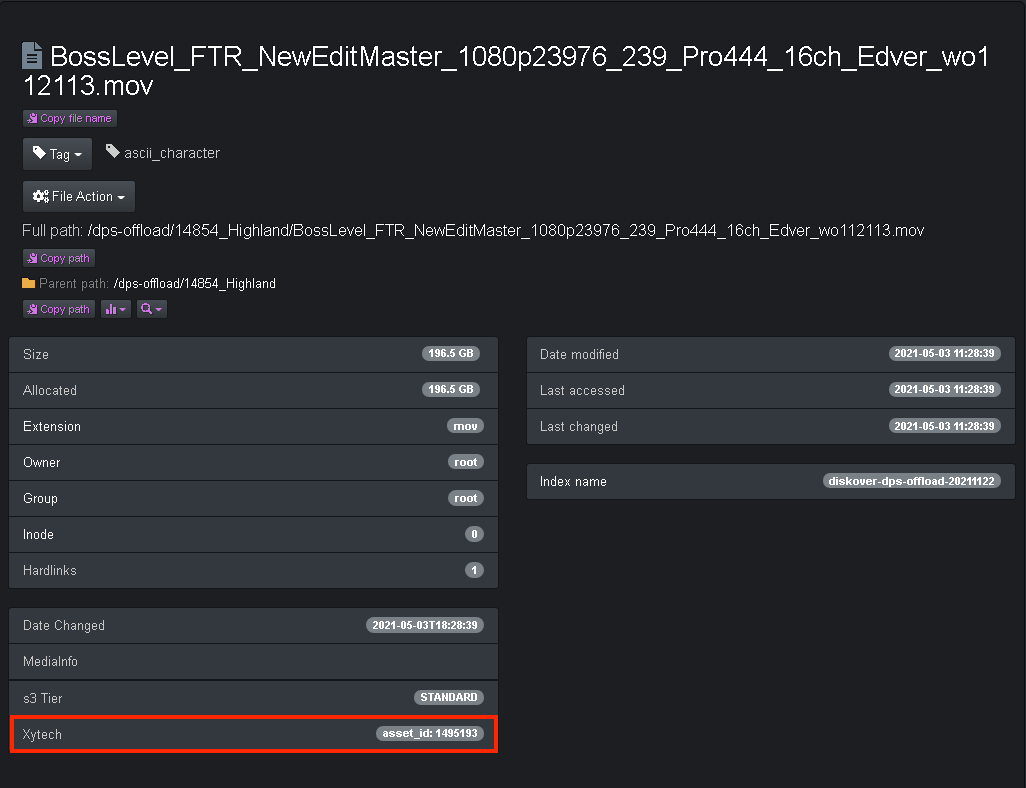
The plugin assumes that assets restored to online media are placed into a folder using a specific naming convention. The information is added to the asset within Xaytech, and the asset number is assigned as a field to the file within the Diskover Index.
Media asset in Xytech.
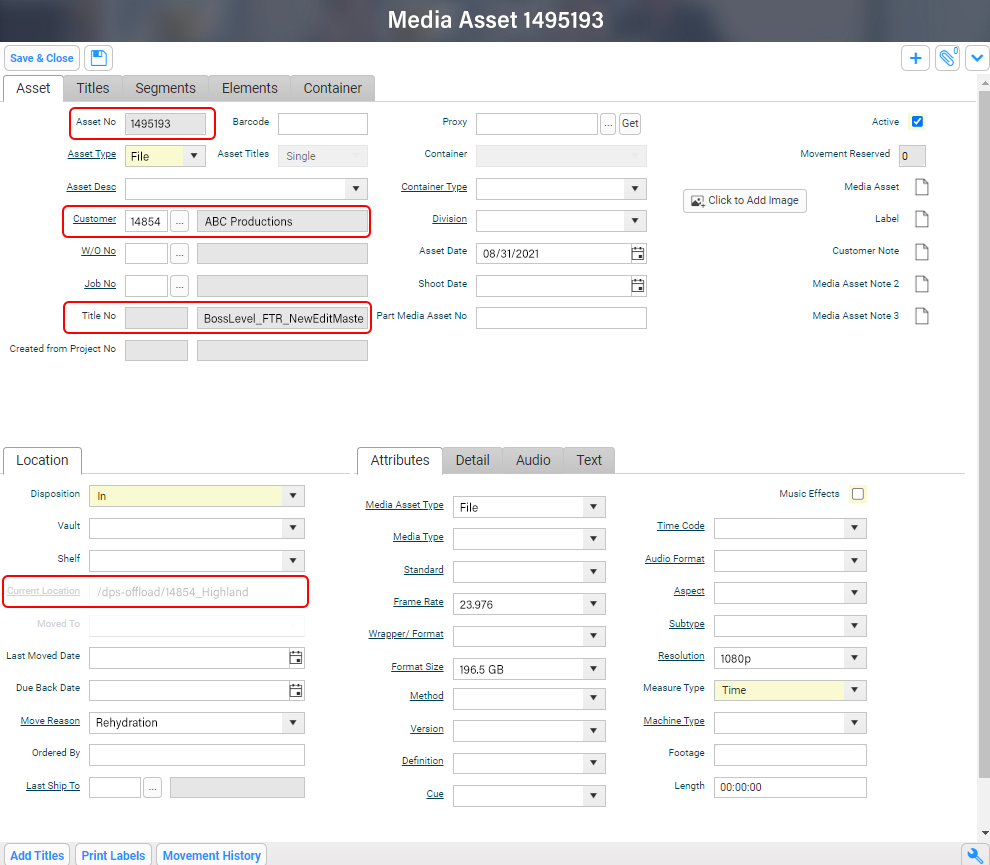
Media asset attribute in Diskover.
Xytech Order Status.
Production status insights for accurate assets correlation.
The Xytech Media Operations Platform order status plugin automates the correlation between the order management and storage systems by harvesting key business context from Xytech and enriching Diskover’s metadata catalog. In turn, this business context metadata can be used to automate workflows, curate data, monitor costs, create highly customized reports, and search granularly.
Facilities often manually correlate the order management system with the storage repositories. However, manual processes are subject to human errors and difficult to scale as the volume of media orders and data turnover increases constantly.
Therefore, the lack of integration for file-based workflows between the order management system and the underlying storage repositories makes data management decisions difficult as they are solely based on attributes of files or objects on storage. Additional business context is needed from the order management system to increase the precision and accuracy of data management decisions.
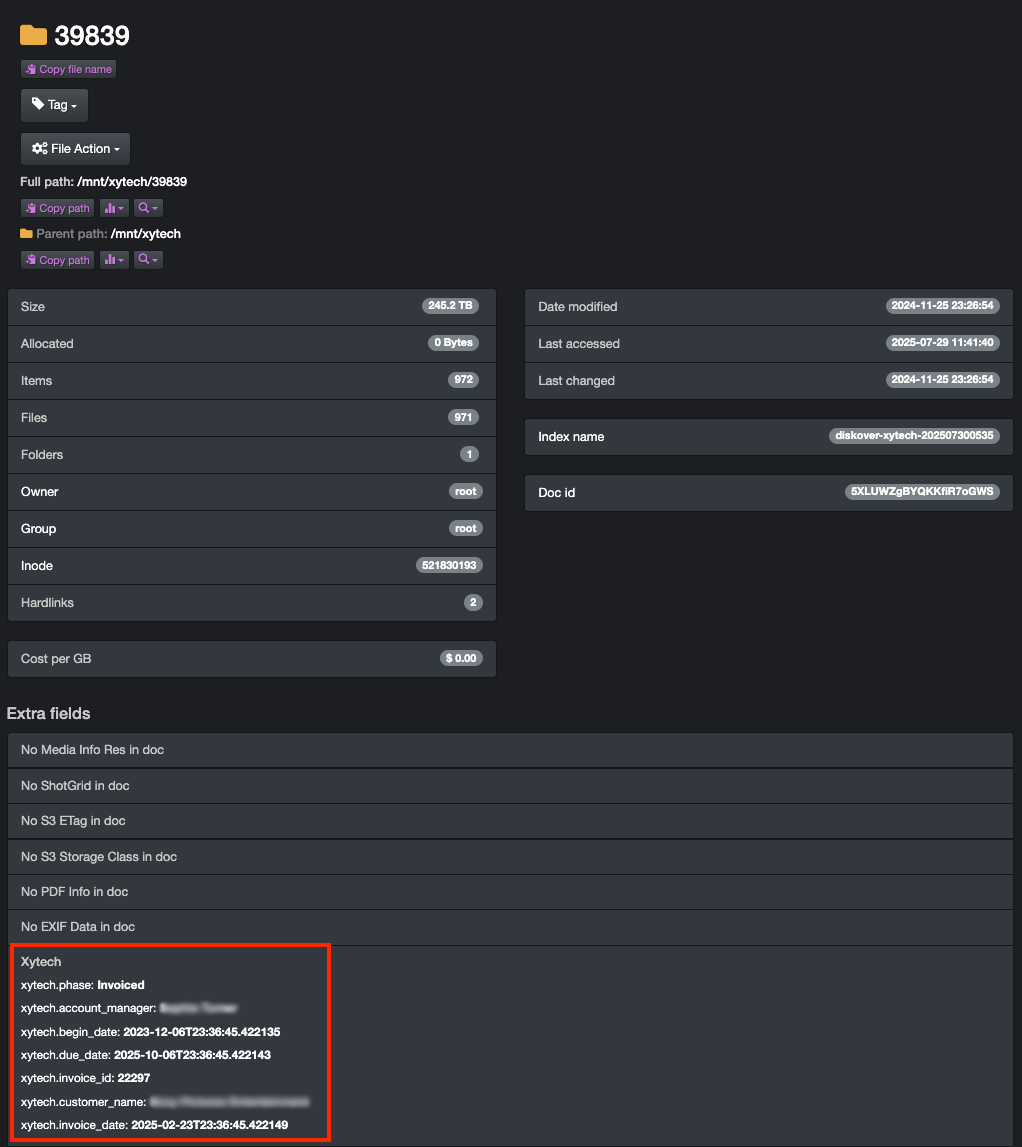
An instance of key information might be the invoice date for a work order. A status change for a work order can be a key indicator for data management; for example, once a Xytech media order has been “invoiced”, then the data associated with that media order can be a candidate for archival.
Xytech production order attributes in Diskover.
Sample of analytics using Xytech Order Status media-centric attributes.
By order status.

This sample showcases Diskover’s customizable analytics, leveraging order status attributes harvested from the Xytech Production Order platform. These enriched attributes add valuable business context to standard data, enabling users to craft tailored queries and gain a comprehensive, actionable overview.
By account manager.

Policy-driven decisions can streamline storage optimization across workflows — whether migrating inactive data to lower-cost tiers, preserving assets for long-term retention, or deleting content after delivery. Diskover’s integrated workflows make every step effortless and fully automated.
Telestream GLIM.
Visibility without access.
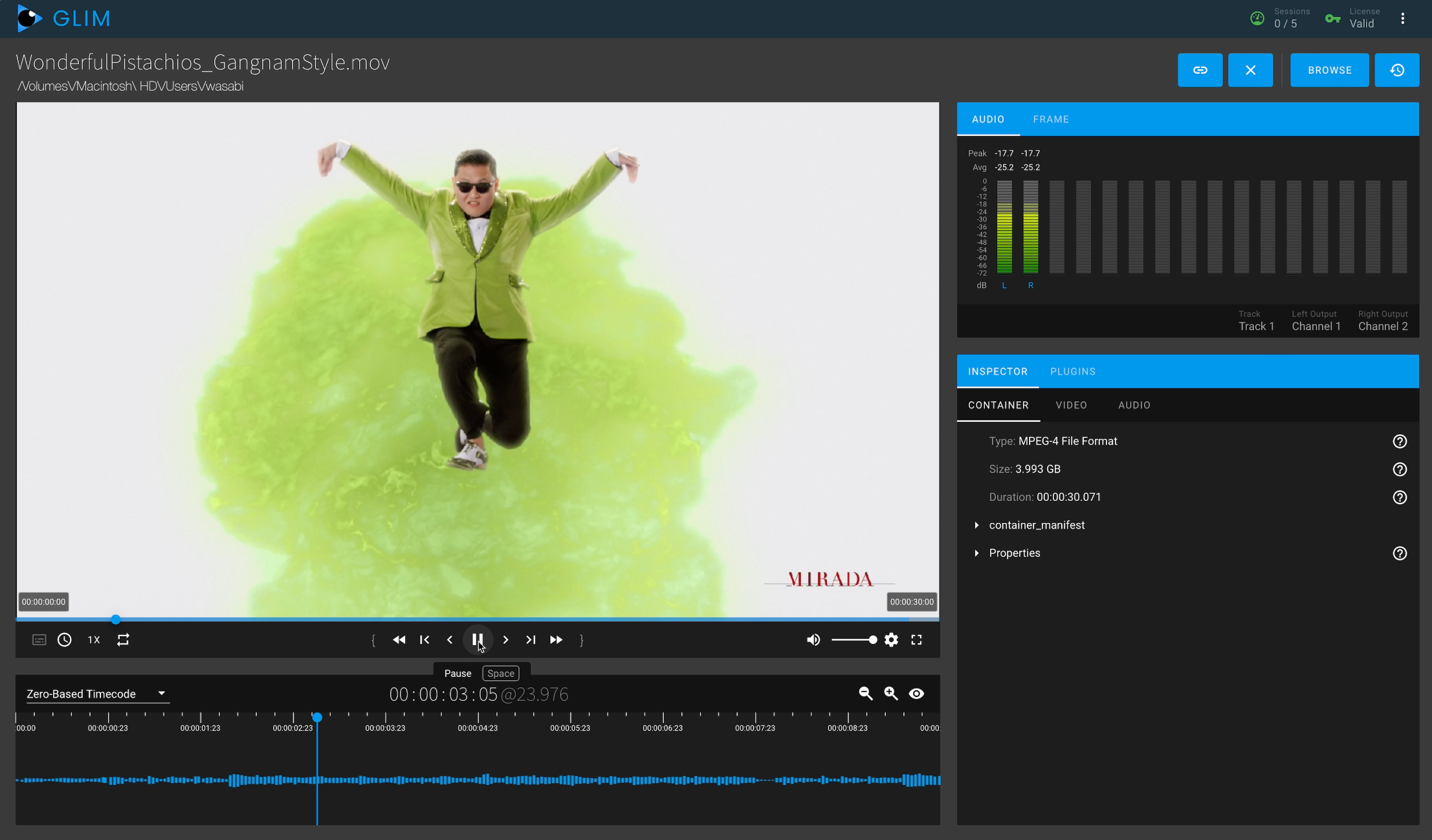
This plugin results in a seamless integration with GLIM, allowing end-users to safely view and validate media files while safeguarding your source assets and production network. Diskover allows users to do advanced searches of media assets, and then launch GLIM in one click via our File Actions. Note that you need to have a GLIM account and be logged in previously to launch the GLIM plugin within Diskover.
Single click launch from Diskover.

GLIM user interface.
Telestream Vantage.
Find. Submit. Done.
The Diskover Telestream Vantage Plugin streamlines file submission for transcoding directly from the Diskover interface — eliminating manual steps and reducing friction between systems.
- Simplified workflow: Submit files for transcoding without switching between applications.
- Focused options: Only relevant Vantage presets are exposed, minimizing confusion for non-technical users.
- Faster onboarding: End-users access Vantage through Diskover — no complex account setup or production network exposure required.
- Enhanced security: Users only interact with read-only metadata, keeping your production environment isolated and protected.
- Global visibility: Diskover’s index makes files easy to locate across projects — no more guessing where assets reside.
- Minimal learning curve: The intuitive integration makes job submission fast and accessible for all users.
Transcoding job selection example.

Transcoding job status within Vantage.

USE CASE
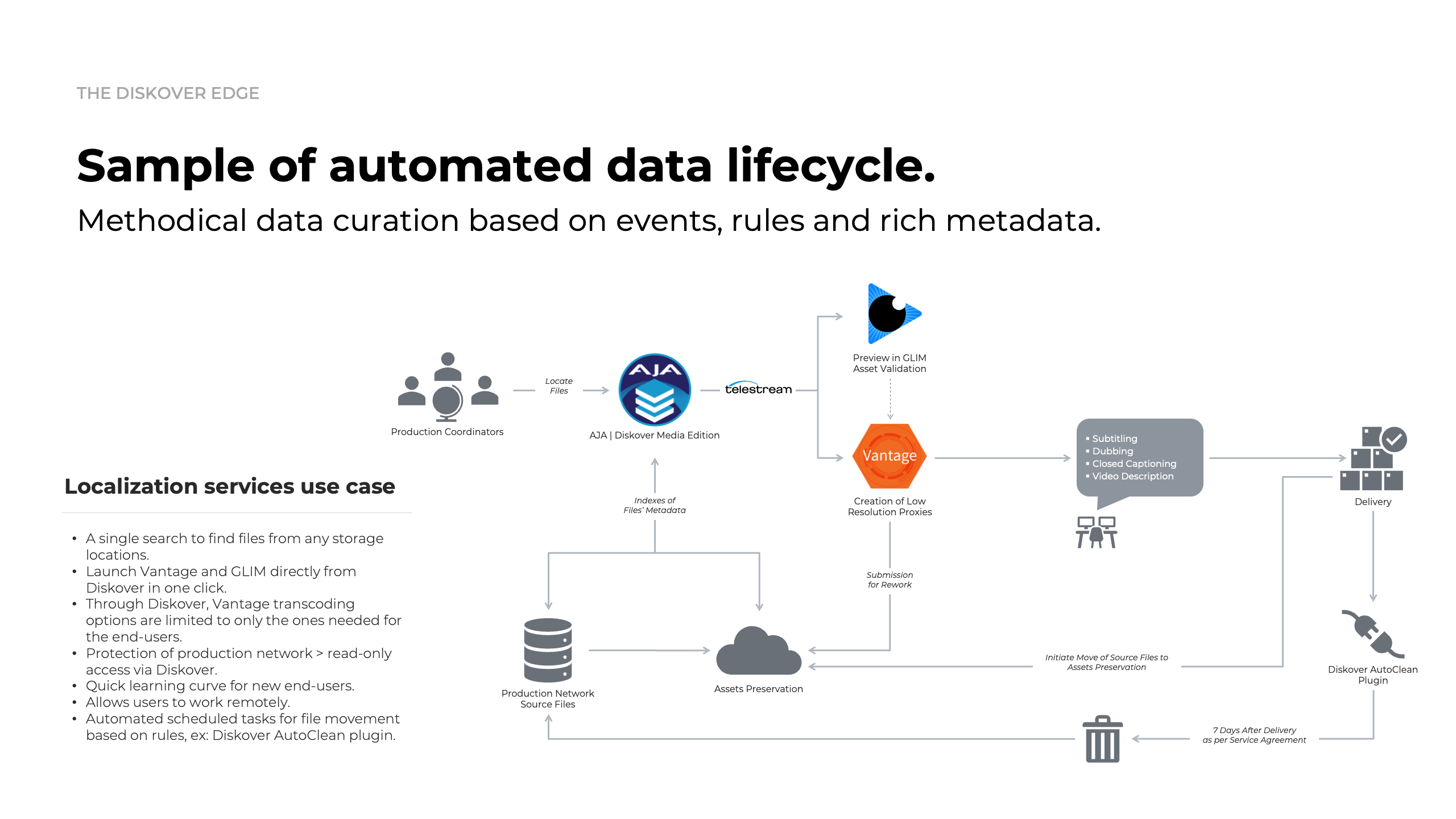
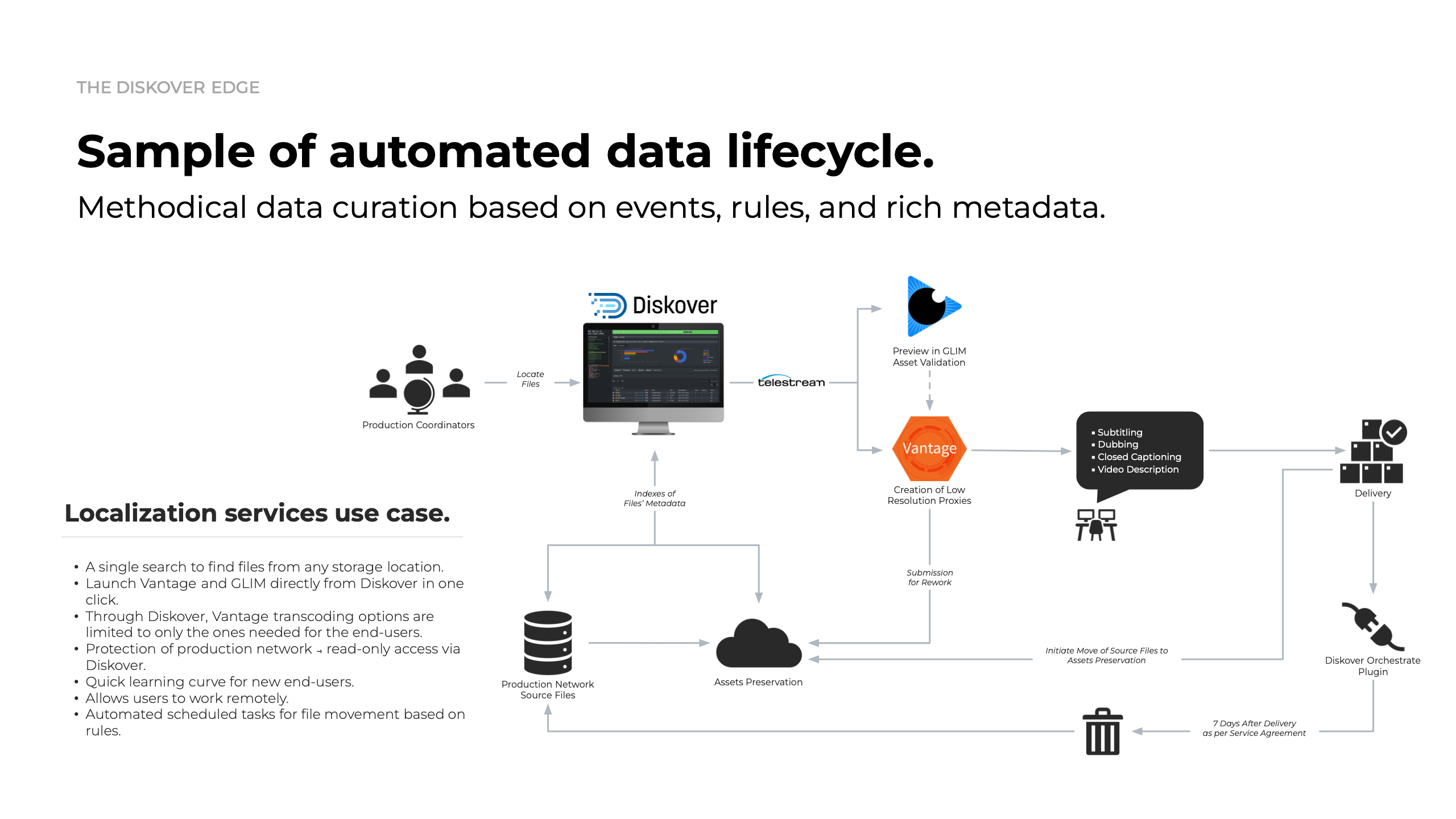
Vantage and GLIM workflow integration at Visual Data for localization services.
The objective of this workflow is to enable the Media Services personnel to create deliverable transcoded files while reducing complexity, security exposures, and human errors.
Source content often resides on production storage that is air-gapped from both the internet and internal IT networks. These file-based workflows are designed to run like a factory floor — with assets continuously moving through each stage of production. By integrating Diskover with Telestream, Media Services teams can securely generate low-resolution proxies without granting direct access to production systems or content.
Diskover’s global index delivers high-speed, read-only search across massive production datasets, enabling users to quickly locate source materials — typically .mov or .mxf files — without elevated permissions. Once located, users can launch Telestream GLIM directly from the Diskover interface to preview and validate assets, eliminating the need to toggle between tools or manually copy file paths.
After validation, users can initiate Vantage workflows directly within Diskover to create low-resolution proxies for localization or review purposes. These proxies are automatically generated and stored in predefined locations, while the original high-resolution sources are moved to S3. Because proxies are fully reproducible, Diskover can automatically clean up completed outputs after a defined retention period. If regeneration is required later, the source material can be easily located and reprocessed via Diskover — repeating the same secure, automated workflow.
Diskover has the ability to work with other applications if they have an SDK available. In the case of Telestream’s Vantage transcoding workflow platform, we have found that a combination of Diskover search tools and Vantage makes a really good team.
To eliminate the need to give users access to production content, and the ability to search through thousands of files, the Diskover team built a Vantage submit tool that directly allows to search a file, select that specific file or multiple files, and submit them to the Vantage workflow of your choice.
It’s extremely versatile and communicates very quickly. This procedure is only in its first phase so expanding it to allow workflow status submission, and more advanced workflows like audio overlay and subtitle overlays is on the road map.
Randall Derchan // IT Manager

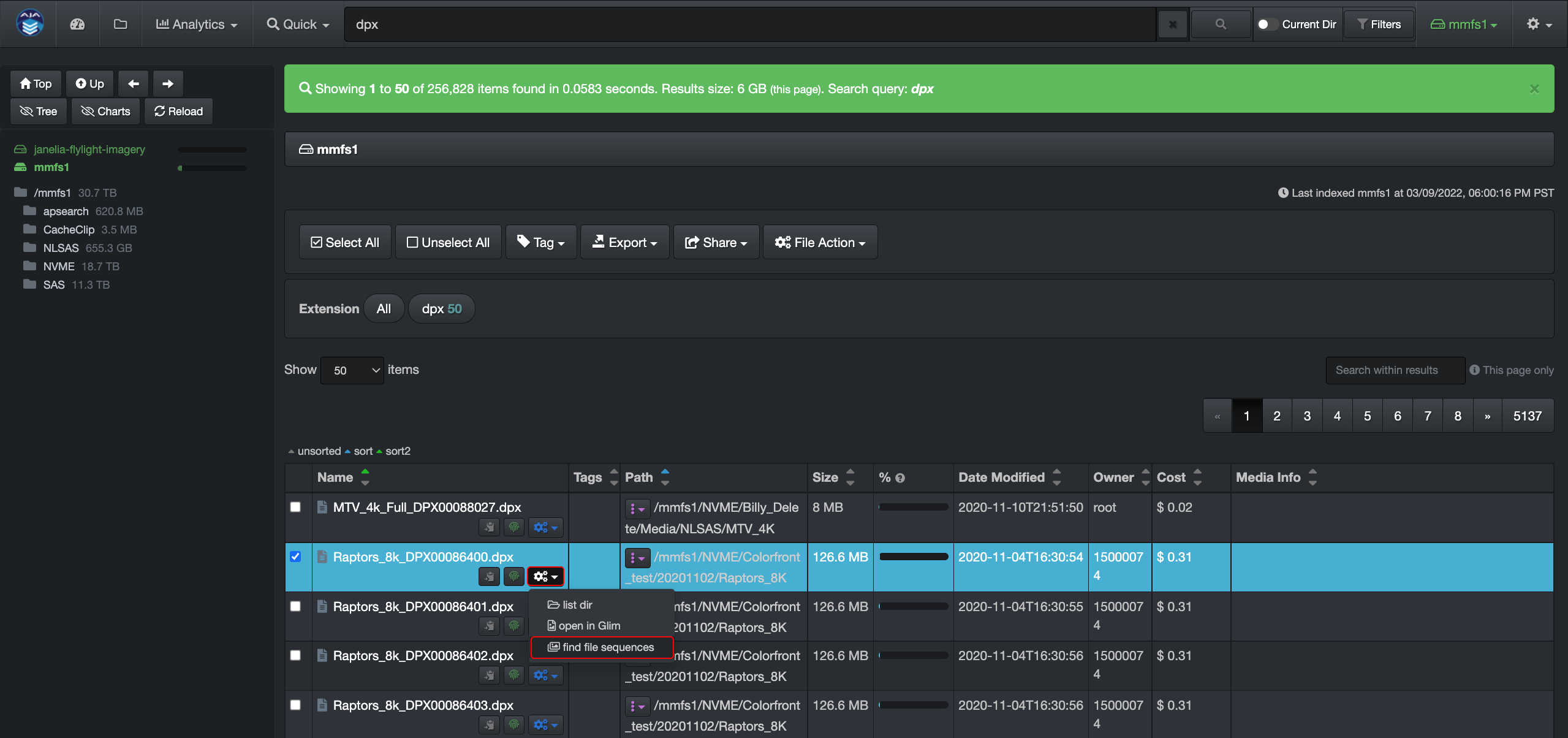
Find File Sequences.
Simple action saves big time.
Always designed for maximum efficiency, Diskover enables users to locate every file in a sequence directly from the File Action menu — all with a single click. Diskover intelligently identifies and groups all related files, saving valuable time and reducing manual effort during review, transfer, or processing workflows.
Launch in one click via File Action.
Comprehensive report.

EDL Check, Upload & Download.
EDL Check File Action.
Empower authorized users to instantly validate Edit Decision List (EDL) files — without needing direct access to production storage. Diskover streamlines verification by making the process fast, secure, and accessible to anyone involved in the creative workflow.
EDL Upload/Download File Action.
Simplify controlled file transfers with confidence. Diskover allows authorized users to upload or download predefined file types and sizes — all without read/write access to production storage. This self-service capability eliminates bottlenecks and reduces reliance on data management teams.
IMF Change Report.
Stay in sync with every IMF revision.
Track every change with confidence. Diskover automatically generates detailed IMF image change reports in both human-readable and machine-readable formats — including EDL references — so teams can quickly identify, review, and reconcile updates across evolving media packages.