

DISKOVER BLOG
From insight to action:
What data automation
actually means.
August 4, 2026 · 5 min read
“Automation” is the most overused word in enterprise technology, and one of the least defined. Vendors attach it to everything, which leaves you with a fair question: automation of what, exactly?
For unstructured data, the answer is specific and practical, and it is worth getting right. The gap between seeing a problem and doing something about it is where most storage budgets quietly leak. Close that gap and the savings hold. Leave it open, and every cleanup you run erodes within a year.
Visibility is table stakes.
Seeing your data is the necessary first step, but visibility alone does not save money or reduce risk. A dashboard that tells you 40% of your storage is cold is useful only if something happens next. A dashboard reports the problem. Automation is what carries the finding through to a result, on a schedule, without asking you to babysit it.
Why manual doesn’t scale.
The reason this work never gets done is not a lack of effort. It is arithmetic.
A single network-attached storage (NAS) array can hold hundreds of millions of files, and an enterprise estate runs into the billions. Reviewing that volume manually, even at one file per second, would take years, and the estate changes faster than any person can read it.
The work is not tedious at that scale. It is impossible.
Automation removes the arithmetic. A policy evaluates every file the moment its metadata is indexed, applies the same rule to a billion objects as easily as to a hundred, and repeats on the schedule you set. What no team could finish once, a policy finishes continuously.
What automation actually means.
For data management, automation means turning policy into action without manual effort. You define a policy once — “archive files not touched in two years” or “tag anything that looks sensitive” — and Diskover applies it continuously across all storage tiers.
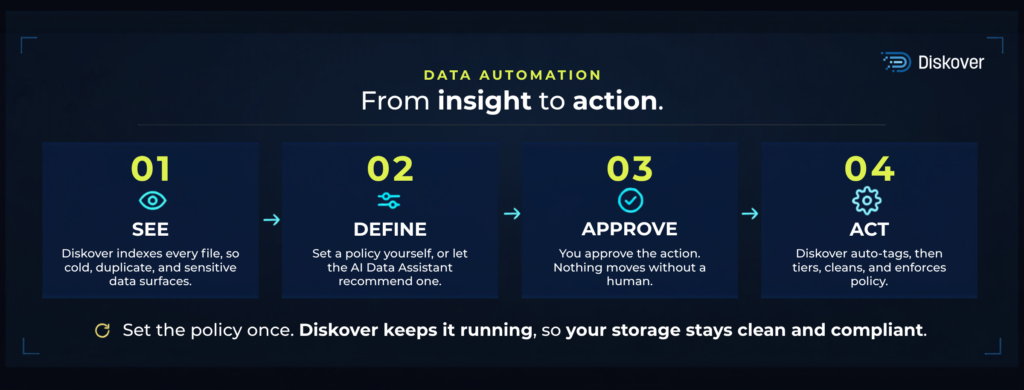
That covers the work that quietly eats your team’s week: tagging files, moving cold data to lower tiers, flagging duplicates, and enforcing retention. Done manually, these tasks never end, because the data keeps growing.
Done manually, these tasks never end, because the data keeps growing. Automated, they run on their own, and what used to take a week is now completed in minutes.
A single policy running on its own is automation. Dozens running in concert across your whole estate — every tier, vendor, and location — is orchestration: the difference between tidying one corner and keeping the entire environment in order.
What a policy looks like in practice.
Take a single rule: archive every file untouched for two years. Here is what runs behind it.
- Diskover indexes metadata across your storage, every vendor, tier, and location, without moving or copying any files.
- It matches files that meet the rule based on last-accessed date, size, owner, and location.
- It presents that set to you, along with the capacity you would reclaim by archiving it.
- You approve.
- Diskover moves the data to the tier you chose, records every action in an audit trail, and updates the index.
- Then it runs again on whatever schedule you set — daily, weekly, or monthly — so files that cross the two-year line are caught the next time it runs, not a year later.
The last step is the one that matters most. A manual cleanup is a snapshot that ages the moment it finishes. A policy is standing infrastructure: it holds the line every time it runs, so the result you approved in January still holds in December.
What to automate first.
You don’t automate everything on day one. Start where the return is largest and the risk is lowest.
- Tiering cold data. Moving inactive files off premium storage frees the most capacity for the least effort.
- Deduplication. Identical and near-identical copies multiply with every project. Removing them is safe and immediate.
- Retention and governance. Enforce how long data lives, and flag sensitive files, so compliance stops depending on memory. When a regulation such as the California Consumer Privacy Act (CCPA) requires you to show what personal data you hold and where it lives, the answer becomes a query rather than a project.
- Tagging for analytics and artificial intelligence (AI). Clean, classified metadata is what turns a raw estate into datasets your models can use.
AI-assisted, human-approved.
Automation raises a fair worry. No one wants software deleting or moving production data on its own. The answer is a model we call AI-assisted, human-approved. The system surfaces what it finds and recommends a next step. A person approves the action before anything happens.
With the Diskover AI Data Assistant, you can ask a question about your storage in plain language, get an answer and a recommendation, and let Diskover tag the matching files so your cleanup, tiering, and governance workflows can act on them. It also collapses the wait: a question that used to mean a multi-day information technology (IT) ticket gets answered in seconds. The intelligence is automated. The decision stays yours.
How the guardrails hold.
AI-assisted, human-approved is a workflow, not a slogan. Three controls make it real.
- Preview. Every policy starts as a dry run. You see exactly which files it would touch and what would change, before anything moves.
- Approval. Nothing acts on production data until a person signs off. The system recommends; you decide.
- Audit trail. Every action is logged: who approved it, what moved, and when, so you can answer for any change months later.
KEY TAKEAWAY
Why this is the step that sticks.
Savings from a one-time cleanup drift back within a year. New projects spin up new duplicates. Cold data ages in. The only way to hold onto savings is to let the policy do the ongoing work, so the estate maintains itself rather than waiting for the next manual audit.
You have already paid to generate this metadata and to buy the storage it describes. Automation is what turns that investment into a compounding return: every run reclaims capacity you already own and hands your team back hours they were never going to win manually.
That is the real promise of automation. Not removing people, but removing the repetitive work that burns your team out, while keeping them in control of the decisions that matter.
See automation you can trust.
Watch a rule go from insight to action, with you in control of every step.
See how policy-driven automation keeps your storage clean without constant manual oversight.